A well-designed penetration testing lab Clara Markus Linux Privilege should feel like a connected security investigation. Instead of presenting learners with unrelated vulnerabilities, it should show how several small weaknesses can combine and eventually lead to complete system compromise.
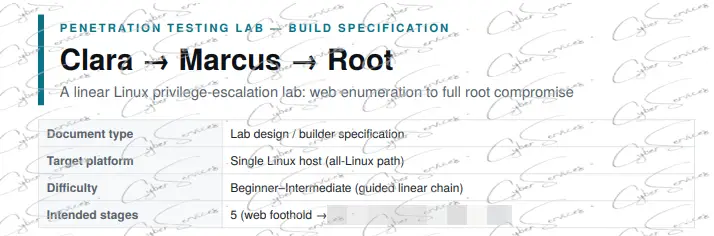
The Clara-to-Marcus-to-root scenario is built around this idea. It is a linear Linux privilege escalation lab that begins with a web application and gradually moves deeper into the target environment.
The lab covers web enumeration, exposed backup files, weak credential management, local system enumeration, insecure database records, password reuse, and excessive sudo privileges. Each security issue contributes to a wider attack path, helping learners understand why seemingly minor misconfigurations should never be evaluated in isolation.
This article provides a general overview of the lab’s structure and learning objectives without revealing its exact solution.
What Is the Clara Markus Linux Privilege?
The Clara-to-Marcus lab is a beginner-to-intermediate penetration testing environment built on a single Linux host.
The server contains a web application, an SSH service, a MySQL database, and multiple local user accounts. Learners are expected to investigate these components and understand how information discovered in one area may affect another.
Clara represents the initial low-privileged user, while Marcus represents an account with greater access to the system. Root is the final security boundary.
The scenario demonstrates an important cybersecurity principle: attackers rarely depend on a single critical vulnerability. A complete compromise is often the result of several smaller security failures that connect naturally.
A Linear and Purposeful Attack Path Clara Markus Linux Privilege
One of the strongest aspects of this penetration testing lab is its linear structure.
Every stage has a specific purpose, and every discovery provides context for the next part of the investigation. This prevents the lab from becoming a confusing collection of unrelated clues.
The general progression includes:
- Web application enumeration
- Discovery of exposed information
- Identification of valid user accounts
- Initial low-privileged access
- Local Linux enumeration
- Database credential exposure
- Analysis of stored user information
- Password reuse between services
- Sudo privilege escalation
- Root-level compromise
The exact technical solution is intentionally not included. The goal is to explain what the lab teaches rather than provide a step-by-step walkthrough.
Web Enumeration and Information Exposure Clara Markus Linux Privilege
The first section of the lab focuses on web enumeration.
The target application includes standard features such as user registration, login functionality, and profile pages. At first glance, the application may appear simple. However, weaknesses in the way it handles profiles, files, or error messages can expose information that should not be publicly accessible.
One of the central themes is backup file exposure. Files with extensions such as .bak are often created during maintenance, development, or configuration changes. If these files remain inside a publicly accessible directory, they may reveal sensitive information.
Depending on their contents, exposed backup files can disclose:
- Application configuration details
- Internal usernames
- Database information
- Password patterns
- Historical credentials
- File paths
- Development notes
- Private application data
The lab encourages learners to look beyond visible pages and consider what may have been unintentionally left behind.
Username Enumeration Risks Clara Markus Linux Privilege
Username enumeration is another important concept covered by the lab.
Web applications sometimes respond differently depending on whether an account exists. For example, an invalid username may trigger one message, while a valid username with an incorrect password produces another.
Although this may appear harmless, it allows an attacker to separate valid accounts from invalid ones.
Usernames may also be exposed through:
- Public member lists
- Sequential profile pages
- Author archives
- API responses
- Backup files
- Verbose login errors
- Application logs
- Predictable email formats
Knowing a valid username reduces uncertainty and makes other authentication attacks more focused. For this reason, applications should use generic error messages and limit unnecessary exposure of account information.
SSH Security and Initial Access Clara Markus Linux Privilege
SSH is widely used to administer Linux systems securely. However, the service is only as strong as its authentication policies.
Weak passwords, reused credentials, exposed account names, and unrestricted password authentication can turn SSH into an entry point. The risk becomes greater when information from a web application can be reused against the operating system.
The lab demonstrates why organizations should not evaluate web security and server security as completely separate areas. A vulnerability in a website may reveal information that affects SSH, databases, internal services, or administrative accounts.
Recommended SSH security controls include:
- Strong and unique passwords
- Key-based authentication
- Multi-factor authentication where supported
- Login rate limiting
- Account lockout controls
- Restricted administrative access
- Monitoring of failed authentication attempts
- Removal of unused accounts
- Network-level access restrictions
These controls reduce the chance that exposed information can be converted into system access.
Local Linux Enumeration Clara Markus Linux Privilege
Obtaining access to a Linux account does not automatically mean the entire server has been compromised. The initial user may have limited permissions and restricted access to sensitive resources.
Local enumeration is the process of understanding what that user can see and do.
Learners may need to evaluate:
- Accessible files and directories
- Application configuration files
- Running services
- Scheduled tasks
- File permissions
- Environment variables
- Installed software
- Backup scripts
- Database configurations
- Sudo permissions
The lab highlights how poor file permissions can expose sensitive data to users who should not have access to it.
Configuration files are especially important because they often contain database usernames, passwords, API keys, tokens, and internal service addresses. These secrets should never be stored in world-readable files.
MySQL Credential Exposure Clara Markus Linux Privilege
The database section of the lab focuses on exposed MySQL credentials and insecure storage practices.
Web applications need a way to connect to their databases. These credentials are commonly stored in configuration files, environment files, content management system settings, or automated backup scripts.
If file permissions are too broad, a low-privileged Linux user may be able to read these credentials and access information stored inside the database.
Sensitive database content can include:
- Usernames
- Email addresses
- Password hashes
- Session information
- Application roles
- Internal notes
- Personal information
- Administrative records
Database credentials should follow the principle of least privilege. An application account should only have the permissions required for its intended function and should not receive unrestricted access to every database.
Password Hash Security Clara Markus Linux Privilege
Passwords should never be stored as plaintext. However, using a hash alone does not automatically make password storage secure.
Weak or outdated hashing algorithms can allow passwords to be recovered when users choose common or predictable values. Even modern password hashing can be undermined by poor configuration, weak passwords, or the absence of unique salts.
Secure password storage should use established password-hashing algorithms such as:
- Argon2id
- bcrypt
- scrypt
- PBKDF2
Organizations should also apply an appropriate work factor and update it over time as computing power increases.
The lab uses password hash security as a learning point. It shows that gaining access to database records may create additional risk when password storage practices are inadequate.
The Danger of Password Reuse
Password reuse is one of the most important themes in the Clara-to-Marcus scenario.
A password exposed through one application becomes far more dangerous when the same password is used for a Linux account, SSH login, database service, email address, or administrative panel.
This is why a breach involving one system can quickly spread to other systems.
Organizations should reduce password reuse through:
- Password managers
- Unique passwords for every service
- Multi-factor authentication
- Centralized identity management
- Credential rotation
- Privileged access management
- Monitoring for exposed credentials
- Regular security awareness training
Technical controls are important, but users and administrators must also understand how one reused password can connect otherwise separate security environments.
Sudo Privileges and Root Access
Sudo allows authorized Linux users to run specific commands with elevated permissions. It is an essential administrative tool, but overly broad sudo access can create a direct route to root.
Users should only receive the privileges required for their responsibilities. Granting unrestricted sudo access to a standard account increases the impact of credential theft or password reuse.
Sudo configurations should be reviewed for:
- Unnecessary administrative permissions
- Excessively broad command access
- Unsafe executable permissions
- Insecure environment settings
- Unrestricted script execution
- Weakly protected privileged accounts
- Outdated access rules
The final stage of the lab illustrates how a compromised account with excessive sudo privileges can turn a limited intrusion into full system compromise.
Why Chained Vulnerabilities Matter
None of the individual weaknesses in this lab needs to be highly advanced.
An exposed backup file, a leaked username, a readable configuration file, a weak password hash, password reuse, and excessive sudo access may each appear manageable when viewed separately.
Together, however, they create a complete attack chain.
This is one of the most valuable lessons in penetration testing. Security findings should not only be rated individually. Testers must also determine whether multiple low- or medium-risk issues can be combined to produce a much more serious impact.
A seemingly minor information disclosure vulnerability may deserve greater attention when it provides the missing information needed to compromise another service.
Learning Objectives
The Clara-to-Marcus Linux privilege escalation lab helps learners understand:
- How web enumeration can expose sensitive information
- Why backup files should never remain publicly accessible
- How username disclosure affects authentication security
- Why SSH requires strong authentication controls
- How local enumeration reveals hidden security weaknesses
- Why configuration file permissions matter
- How exposed MySQL credentials affect application security
- Why password hashing algorithms must be carefully selected
- How password reuse expands the impact of a breach
- Why sudo permissions should follow least privilege
- How multiple vulnerabilities combine into a complete compromise
The emphasis is not simply on reaching root. The real goal is understanding why each weakness exists and how it could have been prevented.
Defensive Recommendations
Organizations can reduce the risks represented in this lab by applying layered security controls:
- Remove unused backup and temporary files from production servers.
- Prevent public access to sensitive configuration files.
- Use generic authentication error messages.
- Enforce strong, unique passwords across all services.
- Prefer SSH keys over password-based authentication.
- Apply strict permissions to application and database files.
- Store secrets in an appropriate secrets-management system.
- Use modern password-hashing algorithms.
- Assign minimum necessary database privileges.
- Review sudo configurations regularly.
- Monitor authentication and privilege escalation activity.
- Test whether separate vulnerabilities can be chained together.
No single control is sufficient. Effective security depends on multiple layers working together.
Frequently Asked Questions
What is a Linux privilege escalation lab?
A Linux privilege escalation lab is an isolated training environment designed to teach how a limited user account may gain additional permissions because of misconfigurations, exposed credentials, insecure services, or excessive privileges.
Is this lab suitable for beginners?
Yes. Its linear structure makes it suitable for learners who already understand basic Linux, networking, web applications, and authentication concepts.
Does this article provide the solution?
No. It explains the lab’s structure, security themes, learning objectives, and defensive lessons without revealing the technical solution or exact commands required to complete it.
Why are backup files dangerous?
Backup files may contain source code, credentials, internal paths, database records, or configuration details. If they are publicly accessible, they can reveal information that helps compromise other services.
Why is password reuse a serious risk?
Password reuse allows credentials exposed through one system to be tested against other accounts and services. This can turn a limited application breach into a wider infrastructure compromise.
What is the role of sudo in Linux security?
Sudo controls which users can perform administrative actions. Incorrect or excessive sudo permissions can allow a compromised user account to obtain root-level access.
Final Thoughts
The Clara-to-Marcus-to-root scenario demonstrates that complete system compromise does not always begin with an advanced exploit. In many cases, the real danger comes from ordinary security mistakes that have been allowed to connect.
An exposed backup file reveals information. Weak credential controls create an entry point. Poor file permissions expose database access. Insecure password practices affect another account, and excessive sudo privileges increase the final impact.
By presenting these issues as one connected Linux security scenario, the lab helps learners think beyond individual vulnerabilities and recognize the wider attack paths that matter in real penetration testing engagements.
Disclaimer: This article is intended exclusively for authorized cybersecurity training, ethical hacking labs, and systems that you own or have explicit permission to test.
Buy this standalone machine
See oscp services list: https://cyberservices.store/certifications/offsec/oscp/