The htb coae walkthrough PhantomKernel environment presents a practical AI and LLM application security assessment built around interconnected vulnerabilities rather than isolated technical questions.
The reviewed COAE Walkthrough contains six documented tasks covering adversarial machine learning, local file inclusion, model extraction, prompt injection, SQL injection, password recovery security, AI agent manipulation, Model Context Protocol security, command injection, and remote code execution risk.
PhantomKernel is hosted through multiple virtual hosts that share the same masked spawn IP. Apache routes requests according to the requested hostname, allowing several applications and AI services to operate from one isolated laboratory environment.
The principal PhantomKernel assets include:
| Asset | General role |
|---|---|
| phantomkernel.htb | Primary PhantomKernel application |
| www.phantomkernel.htb | Public-facing web interface |
| staging.phantomkernel.htb | Staging environment |
| mcp.phantomkernel.htb | Model Context Protocol service |
| Passport API | Diagnostic and model-related service |
| KernelGate | AI-powered HR processing agent |
| SysMind | LLM-based message-processing component |
| Masked spawn IP | 1x1.5x.1xx.xx |
| Application port | Dynamic PORT value |
The PDF intentionally masks the actual spawn address as 1x1.5x.1xx.xx and uses PORT as a placeholder. These values change according to the isolated lab instance and should not be presented as fixed public infrastructure.
This article provides a general, SEO-friendly overview of the challenges and security lessons represented in the COAE PhantomKernel environment. It does not disclose flags, bearer tokens, API keys, credentials, payloads, commands, or step-by-step solutions.
What Is the COAE PhantomKernel Lab?
PhantomKernel is a deliberately vulnerable AI application laboratory designed to evaluate how traditional web vulnerabilities interact with modern machine learning and LLM components.
The environment combines several security layers:
- Conventional web application security
- AI model confidentiality
- Adversarial machine learning
- LLM prompt injection
- AI agent authorization
- Password reset security
- Database protection
- Model Context Protocol security
- Operating system command execution
- Sensitive information disclosure
This structure reflects an important reality in AI security: an AI application does not exist separately from the software around it.
A machine learning model may be protected by an API, but that API still depends on authentication, authorization, file access, databases, sessions, web servers, and operating system permissions. A weakness in any of these layers can affect the AI component.
PhantomKernel Hosts and Application Structure htb coae walkthrough
All PhantomKernel virtual hosts use the same spawn IP address, represented in the report as 1x1.5x.1xx.xx.
The different application components are separated through virtual hostnames:
www.phantomkernel.htbphantomkernel.htbstaging.phantomkernel.htbmcp.phantomkernel.htb
This type of architecture is common in both laboratories and production environments. A single server or reverse proxy may route traffic to different applications according to the hostname supplied in the request.
From a defensive perspective, each vhost should be treated as an independent security boundary. A staging application should not automatically trust users authenticated to the public website, while an MCP service should not inherit unrestricted access merely because it shares infrastructure with the main application.
Organizations should review:
- Cross-subdomain session handling
- Shared authentication systems
- Cookie scope
- CORS policies
- Reverse proxy configuration
- TLS certificate coverage
- Internal hostname exposure
- Staging environment access
- Shared secrets between services
- Backend network permissions
A vulnerability affecting one vhost may become more serious when the same server hosts several connected services.
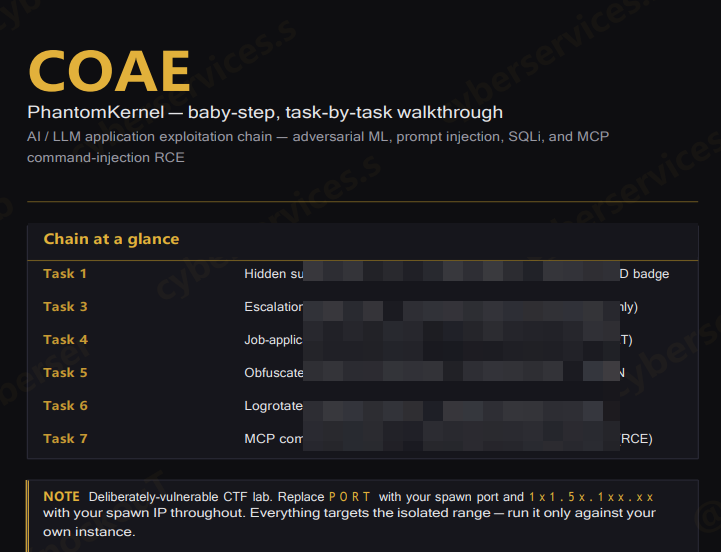
COAE Task Overview htb coae walkthrough
The walkthrough documents the following task themes:
| Task | Primary security topic |
| Task 1 | Hidden support case, LFI, model extraction and white-box PGD |
| Task 3 | Information disclosure and adversarial OCR |
| Task 4 | Resume prompt injection and HR agent data leakage |
| Task 5 | SQL injection, reset tokens and account recovery |
| Task 6 | AI guard manipulation and arbitrary file access |
| Task 7 | MCP command injection and remote execution risk |
Each task connects conventional cybersecurity concepts with AI-specific attack surfaces.
Hidden Support Cases and Information Exposure
The first PhantomKernel task begins with information exposed through a support case system.
Support platforms often contain diagnostic details, error records, internal file paths, tokens, staff messages, and troubleshooting data. Even when a case does not appear in the main user interface, it may remain accessible if the application does not enforce server-side authorization.
Hidden or unlisted content should not be considered protected.
Potential risks include:
- Exposure of internal API endpoints
- Disclosure of bearer tokens
- Configuration file references
- Internal directory information
- AI model locations
- Debugging records
- Employee communications
- Service credentials
Support systems should apply authorization checks to every case and attachment. Sequential identifiers should not allow one user to access another user’s records.
Sensitive values should also be removed from diagnostic messages before they are displayed or stored.
Local File Inclusion in the Passport API htb coae walkthrough
The Passport component includes diagnostic file-reading functionality associated with a local file inclusion risk.
Local file inclusion occurs when an application uses user-controlled input to select a server-side file without sufficiently restricting the permitted location.
Depending on the application’s permissions, LFI can expose:
- Configuration files
- Environment variables
- Application source code
- API tokens
- Session data
- System account information
- AI model paths
- Internal documentation
- Service credentials
In an AI application, the risk extends beyond traditional configuration files. Local file access may also expose model weights, tokenizers, class mappings, preprocessing rules, or system prompts.
Defensive controls should include fixed file identifiers, strict server-side allowlists, normalized path validation, minimal service permissions, and separation between public APIs and diagnostic functionality.
Model Weight Confidentiality
The PhantomKernel chain demonstrates how web application weaknesses may affect the confidentiality of machine learning assets.
Model weights represent learned parameters generated during training. They may contain intellectual property, proprietary decision logic, and information about the structure of a classification system.
Exposed model assets may help an unauthorized party understand:
- Model architecture
- Input dimensions
- Output classes
- Preprocessing operations
- Classification thresholds
- Confidence behavior
- Weak decision boundaries
Organizations should not assume that model files are safe simply because they are not linked from the public interface.
Machine learning assets should be stored outside public web directories and protected through authentication, authorization, encryption, access monitoring, and secure deployment pipelines.
White-Box Adversarial Machine Learning
Task 1 includes a white-box adversarial machine learning scenario involving Projected Gradient Descent.
A white-box attack assumes the tester has detailed knowledge of the target model. This may include its architecture, weights, preprocessing behavior, gradients, and classification outputs.
Projected Gradient Descent, commonly abbreviated as PGD, evaluates whether small and controlled input modifications can change a model’s decision while remaining within a defined perturbation budget.
The security issue is not limited to image classifiers. Similar robustness concerns can affect:
- Identity verification
- Document classification
- Fraud detection
- Malware classification
- Content moderation
- OCR systems
- Biometric applications
- Automated approval systems
A model that performs well on ordinary test data may still behave unpredictably when inputs are deliberately manipulated.
Adversarial Badge Classification
The PhantomKernel scenario uses an AI-powered badge classification process.
This represents a broader class of applications in which visual input influences an access or authorization decision. When machine learning output directly controls privileges, misclassification can become a security issue rather than a simple accuracy problem.
Sensitive decisions should not depend entirely on one model prediction.
Additional controls may include:
- Independent server-side authorization
- Human review for high-risk decisions
- Confidence thresholds
- Anomaly detection
- Image integrity validation
- Rate limiting
- Audit logging
- Multiple verification signals
AI should support an authorization workflow, not replace the complete security boundary.
Adversarial OCR Tiles
Task 3 focuses on adversarial OCR and escalation-pattern disclosure.
Optical character recognition converts images into machine-readable text. It is used in document processing, identity checks, invoices, medical records, forms, and automated content review.
An adversarial OCR input may appear ordinary to a person while producing unexpected machine-readable text. This creates risk when OCR output is passed directly to another automated system.
Potential consequences include:
- Incorrect text extraction
- Bypassed content filters
- Misclassified documents
- Hidden instructions reaching an LLM
- Manipulated workflow decisions
- Unauthorized escalation
- Incorrect data processing
OCR output should be treated as untrusted input. Applications should validate the extracted text before passing it to an AI agent, database, operating system process, or authorization workflow.
KernelGate HR Agent htb coae walkthrough
Task 4 introduces KernelGate, an LLM-powered HR agent that reviews job applications and summarizes uploaded resumes.
This represents a realistic enterprise use case. Organizations increasingly use AI systems to classify applications, extract candidate information, summarize documents, and support recruitment decisions.
However, resumes and application documents are untrusted external content. If an LLM treats document text as instructions, a maliciously prepared resume may influence the model’s behavior.
The KernelGate scenario focuses on the possibility of sensitive system information appearing in the generated application result.
Prompt Injection Through Uploaded Documents
Prompt injection occurs when untrusted content influences an LLM in a way that conflicts with the application’s intended rules.
In document-processing systems, the injected instructions may be hidden inside:
- Resumes
- PDF files
- Support tickets
- Web pages
- Email messages
- Images processed by OCR
- Database records
- Uploaded text files
The AI model may not reliably distinguish between instructions provided by the application and instructions found inside the document.
This can lead to:
- System prompt disclosure
- API key exposure
- Unauthorized tool use
- Altered summaries
- Skipped safety checks
- Incorrect classification
- Leakage of internal context
Organizations should minimize the amount of sensitive information placed in system prompts. Secrets should never be used as ordinary prompt text.
HR API Key Security
The PhantomKernel walkthrough connects prompt injection with the exposure of an HR-related API key.
API credentials should be stored and enforced outside the LLM context. The model should receive only the minimum information needed to complete the current task.
Recommended controls include:
- External secret management
- Short-lived credentials
- Narrow API scopes
- Per-service identities
- Output filtering
- Tool-level authorization
- Detailed access logging
- Credential rotation
- Separation of model context and secrets
Even if an LLM reveals its full system prompt, that disclosure should not provide a credential capable of accessing sensitive services.
SQL Injection and reset_tokens
Task 5 combines SQL injection with the application’s password reset workflow.
The report references a reset_tokens table used to store password recovery information. Password reset records are highly sensitive because possession of a valid token may allow an account password to be changed without knowing the existing password.
SQL injection can expose:
- User accounts
- Password records
- Reset tokens
- Application messages
- Administrative data
- Session information
- API credentials
Applications should use parameterized queries or prepared statements for every database operation. Keyword blocking or AI-based query filtering should not be treated as a substitute for secure query construction.
The Limitations of LLM Security Filters htb coae walkthrough
The PhantomKernel application includes an LLM-related filter intended to identify suspicious database input.
This illustrates a key AI security lesson: probabilistic language models should not replace deterministic controls for well-understood technical risks.
An LLM may fail to recognize:
- Obfuscated input
- Alternative syntax
- Encoded values
- Unexpected spacing
- Comments inserted into keywords
- Unfamiliar database dialects
- Context-dependent payloads
SQL injection should be prevented through parameterized queries, database permissions, schema design, and safe application logic. An AI classifier can provide an additional monitoring layer, but it should not become the primary defense.
Password Reset Security
The password recovery process is a critical account security boundary.
A secure reset system should use:
- Cryptographically random tokens
- Short expiration periods
- Single-use enforcement
- Secure database storage
- Invalidation after use
- Rate limiting
- User notification
- Protection against account enumeration
- Session revocation after reset
Reset tokens should not be displayed in logs, AI responses, application search results, or administrative messages.
A password reset workflow must be protected as carefully as the normal login process.
Administrative Account Risk
Task 5 ultimately focuses on the security impact of gaining administrative application access.
Administrative accounts usually have access to data and functionality unavailable to normal users. This may include messages, user records, integrations, service credentials, configuration settings, and internal tools.
Organizations should protect administrative access through:
- Multi-factor authentication
- Dedicated administrator accounts
- Strong session management
- Login monitoring
- IP or network restrictions
- Short session lifetimes
- Re-authentication for critical changes
- Least-privilege roles
A single application administrator should not automatically receive unrestricted access to every connected AI or infrastructure service.
SysMind and AI Guard Manipulation htb coae walkthrough
Task 6 introduces SysMind, an AI-based component that processes recent messages submitted through a contact interface.
The scenario examines whether a sensitive file can be reframed as an approved or permitted log file. This represents a contextual authorization problem.
The AI guard appears to make a decision based on how the requested resource is described rather than relying entirely on a deterministic access policy.
An LLM may be persuaded to reinterpret:
- Sensitive files as diagnostic logs
- Private records as public documentation
- Restricted commands as maintenance operations
- Untrusted content as administrator instructions
- Data extraction as ordinary troubleshooting
Authorization should never depend solely on whether an AI model considers a request reasonable.
Arbitrary File Read Through AI Agents
An AI agent with file-reading capabilities can create significant risk if its permissions are too broad.
Potentially exposed data may include:
- Environment files
- API credentials
- SSH keys
- Database passwords
- Source code
- Application logs
- Customer information
- AI system prompts
- Internal documents
The agent should receive access only to approved directories and specific file types. File permissions should also be enforced by the operating system or sandbox, not only through prompt instructions.
An AI model can make a decision, but the underlying tool must enforce the final authorization boundary.
Model Context Protocol Security
Task 7 introduces an MCP service through mcp.phantomkernel.htb.
Model Context Protocol enables AI applications to communicate with external tools and data sources through a structured interface. This can improve interoperability, but it also introduces a high-value security boundary.
An MCP server may expose tools capable of:
- Reading files
- Querying databases
- Creating exports
- Managing application records
- Accessing internal APIs
- Triggering automation
- Processing external input
Each tool should be reviewed according to the real-world actions it can perform.
JSON-RPC Sessions and Authentication
The PhantomKernel MCP service communicates through JSON-RPC over HTTP and uses authenticated sessions.
Secure MCP session management should consider:
- Strong transport encryption
- Secure authentication
- Short-lived session identifiers
- Session binding
- Replay protection
- Per-tool authorization
- Request validation
- Rate limiting
- Detailed audit logs
A valid MCP session should not automatically provide access to every available tool. Permissions should be evaluated separately for each action and resource.
MCP Tool Enumeration htb coae walkthrough
The report indicates that the MCP service exposes multiple tools, including a newsletter subscriber export function.
Tool metadata can reveal the capabilities and trusted integrations available to an AI agent. This means tool enumeration should be controlled and limited to authenticated users with a legitimate need.
Tool descriptions should not expose:
- Internal file paths
- Backend command syntax
- Database credentials
- Administrative implementation details
- Hidden environment variables
- Unnecessary debugging information
MCP tools should be designed as narrow business functions rather than generic interfaces to the operating system.
Command Injection in MCP Tools htb coae walkthrough
The final PhantomKernel task represents a command injection risk involving a tool argument that reaches an operating system process without sufficient validation.
This is an important reminder that structured AI protocols do not automatically make backend implementations secure.
A JSON-RPC argument is still untrusted input. If it is passed into a shell command, it may affect the underlying operating system.
Potential consequences include:
- Unauthorized file access
- Data extraction
- Service disruption
- Credential exposure
- Internal reconnaissance
- Remote code execution
MCP tool developers should avoid invoking a shell with user-controlled values. Safer APIs, strict allowlists, fixed arguments, sandboxing, and low-privileged service accounts provide stronger protection.
Time-Based Blind Behavior htb coae walkthrough
The report describes a time-based blind extraction concept in the context of the MCP command injection vulnerability.
A blind vulnerability does not necessarily return command output directly. Instead, observable differences such as response time may reveal whether a tested condition was true or false.
This illustrates an important defensive principle: hiding output does not eliminate the underlying vulnerability.
Security monitoring should identify:
- Repeated requests with small input variations
- Unusual response-time patterns
- High-volume tool invocations
- Unexpected shell subprocesses
- Access to sensitive file paths
- Long-running requests
- Repeated session activity
The underlying command injection must be removed rather than relying on the absence of visible output.
COAE PhantomKernel Attack Surface
The PhantomKernel lab combines several interconnected security weaknesses:
- Hidden support case exposure
- Local file inclusion
- Model weight disclosure
- White-box adversarial machine learning
- Adversarial OCR
- Resume-based prompt injection
- System prompt leakage
- HR API key exposure
- SQL injection
- Reset token exposure
- Password recovery abuse
- AI guard manipulation
- Arbitrary file reading
- MCP tool exposure
- Command injection
- Remote code execution risk
This combination demonstrates why AI red teaming must include both AI-specific and conventional application testing.
Key Skills Represented in the COAE Walkthrough
Based on the walkthrough, the PhantomKernel environment evaluates understanding of:
- AI application architecture
- Virtual host security
- Local file inclusion
- Sensitive token protection
- Machine learning model confidentiality
- Adversarial ML
- Projected Gradient Descent
- OCR robustness
- LLM prompt injection
- System prompt security
- API key management
- SQL injection
- Password reset design
- AI guardrail limitations
- Agent tool authorization
- MCP session security
- JSON-RPC security
- Command injection
- Blind vulnerability behavior
- Professional reporting
Candidates must understand not only what type of vulnerability exists but also how it affects the wider AI application.
Frequently Asked Questions htb coae walkthrough
What is the COAE PhantomKernel lab?
PhantomKernel is an isolated AI and LLM application security environment covering adversarial machine learning, prompt injection, SQL injection, file access, MCP security, and command execution risks.
Which hostnames are included? htb coae walkthrough
The documented vhosts are www.phantomkernel.htb, phantomkernel.htb, staging.phantomkernel.htb, and mcp.phantomkernel.htb.
What is the PhantomKernel IP address? htb coae walkthrough
The PDF masks the dynamic spawn IP as 1x1.5x.1xx.xx. The actual address depends on the individual laboratory instance.
Does the COAE Walkthrough contain a Domain Controller?
No. The reviewed PhantomKernel environment is focused on AI, LLM, web application, and MCP security. It does not document an Active Directory Domain Controller or user workstation.
What is KernelGate?
KernelGate is the LLM-powered HR component that processes job applications and resumes in the PhantomKernel environment.
What is SysMind?
SysMind is an AI-based message-processing component associated with contextual authorization and file-access security.
Does PhantomKernel include adversarial machine learning?
Yes. The walkthrough covers white-box PGD and adversarial OCR concepts.
Does the lab include prompt injection?
Yes. The environment includes prompt injection through an uploaded job application and contextual manipulation of an AI agent.
Is MCP security included?
Yes. The final task covers MCP sessions, tool exposure, unsafe argument handling, and command injection risk.
Does this article reveal the walkthrough solution?
No. It explains the applications, hostnames, technologies, and security lessons without publishing flags, credentials, tokens, API keys, payloads, commands, or step-by-step instructions.
Final Thoughts
The COAE PhantomKernel Walkthrough demonstrates that AI security is inseparable from traditional application security.
The PhantomKernel vhosts share one laboratory IP but expose different services and trust boundaries. The Passport API introduces file access and model confidentiality concerns. KernelGate demonstrates how untrusted resumes can influence an HR-focused LLM. SysMind highlights the danger of allowing language models to interpret authorization rules.
The MCP service at mcp.phantomkernel.htb extends the risk further by connecting an AI system to backend tools. When tool arguments reach sensitive operating system functions without strict validation, an AI integration issue can become a broader infrastructure compromise.
The central lesson is clear: prompts and model guardrails are not replacements for authentication, authorization, parameterized queries, file permissions, input validation, sandboxing, or least privilege.
A secure AI application requires protection at every layer, from the model and system prompt to the API, database, MCP tools, operating system, and network architecture.
Disclaimer: This article is intended for general COAE awareness and authorized AI security education. It does not disclose confidential flags, credentials, bearer tokens, API keys, payloads, commands, or complete laboratory solutions.
Vendor: https://academy.hackthebox.com/preview/certifications/htb-certified-offensive-ai-expert
Buy other HTB Certs: https://cyberservices.store/
Buy COAE Report: