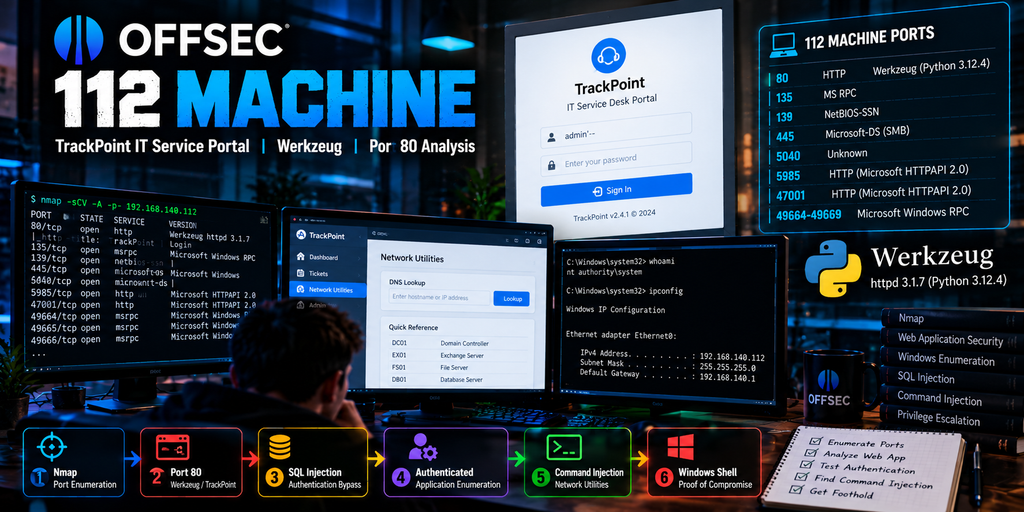
OffSec Trackpoint IT Service presents a Windows target where service enumeration quickly makes port 80 the most interesting entry point: a Werkzeug-powered TrackPoint IT Service Portal is exposed alongside SMB, RPC, WinRM-related HTTP services and several high Windows RPC ports.
The machine is useful because the attack path is not based on blindly testing every open port. Initial Nmap results provide several possibilities, but HTTP enumeration reveals the application that ultimately drives the compromise path.
The supplied assessment identifies the target as 192.168.140.112 and documents the progression from port enumeration to TrackPoint authentication testing, post-authentication discovery and a vulnerable network utility. 112 TrackPoint IT Service Desk …
Quick Answer: OffSec 112 Machine exposes ports 80, 135, 139, 445, 5040, 5985, 47001 and 49664–49669. Port 80 hosts a TrackPoint IT Service Desk Portal served through Werkzeug/Python. The supplied lab report shows that weaknesses in the application’s authentication and network utility functionality create the primary path through the target.
OffSec 112 Machine Ports
The first stage of OffSec Trackpoint IT Service is conventional network enumeration.
The supplied Nmap scan identifies:
80
135
139
445
5040
5985
47001
49664
49665
49666
49667
49668
49669
This immediately looks like a Windows target.
Ports 135, 139 and 445 point toward common Windows RPC, NetBIOS and SMB functionality, while 5985 is commonly associated with Windows Remote Management infrastructure.
The unusual part is port 80.
Instead of treating every service equally, the HTTP fingerprint gives us a much stronger lead.
Port 80: Werkzeug and TrackPoint
Nmap identifies port 80 as HTTP and reports:
Werkzeug httpd 3.1.7
with:
Python 3.12.4
The HTTP title also identifies the application as:
TrackPoint | Login
Visiting the web service leads to the TrackPoint IT Service Desk Portal login page shown in the supplied report.
This makes HTTP the most obvious application-level enumeration target.
Werkzeug itself is a Python WSGI utility library rather than a complete web framework. Its official documentation describes it as a comprehensive WSGI web application library. werkzeug.palletsprojects.com
More importantly, Werkzeug’s documentation warns that its built-in development server is intended for local development rather than production deployment. werkzeug.palletsprojects.com
Official Werkzeug Documentation
That does not mean that seeing Werkzeug automatically gives us an exploitable vulnerability.
It is a technology fingerprint.
The next step is therefore application enumeration rather than assuming the HTTP server itself is the vulnerability.
TrackPoint IT Service Portal
The web application exposed by OffSec Trackpoint IT Service identifies itself as the TrackPoint IT Service Desk Portal.
According to the supplied PDF, the application reports version:
TrackPoint v2.4.1
The login interface accepts a username and password and initially appears like a conventional internal IT service-management portal.
The assessment therefore shifts from infrastructure enumeration to authentication testing.
This distinction matters.
Finding Werkzeug tells us something about the technology stack. Finding TrackPoint tells us what application functionality actually needs to be tested.
TrackPoint Authentication Analysis
The supplied assessment identifies a weakness in the TrackPoint authentication mechanism consistent with SQL injection.
Testing of the login parameters shows that manipulated input can alter the application’s expected authentication logic and provide authenticated access without possession of a normal account credential.
The exact payload is less important than the underlying problem:
user-controlled authentication input appears to influence a backend SQL query without adequate separation between data and query logic.
For an OffSec-style lab, this is an important enumeration lesson.
A login page should not immediately trigger credential guessing.
Instead, examine:
- input handling;
- authentication responses;
- error behavior;
- parameter processing;
- session behavior;
- backend technology clues;
- differences between valid and invalid requests.
The OffSec Trackpoint IT Service path demonstrates why application behavior can be more valuable than simply attacking exposed Windows services first.
Authentication Bypass Changes the Attack Surface
After successful authentication, TrackPoint exposes additional functionality that was not available from the login page.
The supplied report shows three principal areas:
- Dashboard
- Tickets
- Network Utilities
This is where the application’s attack surface expands significantly.
The Dashboard itself provides contextual information about the environment, while the ticketing system exposes operational details that can help a tester understand how the application is used.
The more important discovery is Network Utilities.
TrackPoint Network Utilities
The authenticated TrackPoint interface contains a Network Utilities section.
Its DNS lookup functionality allows the user to submit a hostname and have the server perform a lookup.
The same page also exposes a Quick Reference panel listing internal infrastructure.
The screenshot in the supplied PDF shows entries corresponding to roles such as:
- Domain Controller
- Exchange Server
- File Server
- Database Server
This is useful from an enumeration perspective because the web application is now revealing information about the internal network architecture.
An externally simple helpdesk portal has therefore become a source of internal infrastructure intelligence.
Why DNS Lookup Functionality Deserves Attention
Any server-side feature that accepts user-controlled input and passes that value into another operating-system or network function deserves careful validation.
Examples include:
- DNS lookup tools;
- ping utilities;
- traceroute functionality;
- diagnostic interfaces;
- backup commands;
- file conversion utilities;
- administrative troubleshooting tools.
The security question is straightforward:
Does the application safely treat the submitted value as data, or can it influence the command executed by the operating system?
In OffSec Trackpoint IT Service, this distinction becomes critical.
Command Injection in TrackPoint
The supplied report identifies the TrackPoint DNS lookup feature as vulnerable to command injection.
Testing demonstrates that additional operating-system instructions can influence the server-side command executed by the application.
The assessment then confirms that this behavior can move the attack from:
web application access
to:
operating-system command execution.
This is the most important transition in the OffSec Trackpoint IT Service attack path.
The application is no longer merely exposing internal information.
It is providing a route into the underlying Windows system.
For security reasons, the exact reverse-shell payload from the supplied report is not reproduced here. The useful preparation lesson is recognizing the vulnerable data flow:
User Input → TrackPoint Network Utility → Server-Side Command → Windows OS
From Web Application to Windows Shell
Once operating-system command execution is established, the scope of the assessment changes again.
At the beginning, the target was simply a collection of open ports.
Then it became a web application.
After authentication bypass, it became an authenticated internal service portal.
After command injection, the tester reaches the Windows operating system underneath that application.
The supplied report demonstrates successful command execution and subsequently records proof of compromise from the target. 112 TrackPoint IT Service Desk …
This sequence is much more valuable to understand than memorizing an individual command.
OffSec 112 Machine Attack Path
The overall path can be summarized as:
OffSec 112 Machine
↓
Nmap Enumeration
↓
Port 80 / HTTP
↓
Werkzeug + Python
↓
TrackPoint IT Service Portal
↓
Authentication Testing
↓
Authentication Bypass
↓
TrackPoint Dashboard
↓
Network Utilities
↓
DNS Lookup Functionality
↓
Command Injection
↓
Windows Command Execution
↓
Proof of Compromise
The progression demonstrates how one piece of information creates the next testing decision.
Why Port 80 Matters More Than the Number of Open Ports
The OffSec 112 Machine exposes more than a dozen TCP ports when the high RPC range is counted individually.
That does not mean every port deserves equal time.
Good enumeration is about prioritization.
The HTTP service immediately provides:
- A recognizable application.
- A login interface.
- A technology fingerprint.
- A specific application version.
- User-controlled input.
- Additional authenticated functionality.
Those characteristics make port 80 a particularly rich attack surface.
By comparison, knowing that RPC or SMB exists is useful, but the supplied attack path does not require forcing those services to become the initial entry point.
Werkzeug Is a Clue, Not the Vulnerability
One mistake when approaching OffSec Trackpoint IT Service would be to see Werkzeug and immediately search for a ready-made Werkzeug exploit.
The PDF does not support that conclusion.
The documented vulnerabilities are found in TrackPoint application functionality, not demonstrated as a vulnerability in Werkzeug itself.
That distinction is important for both penetration testing and reporting.
Technology:
Werkzeug
Application:
TrackPoint IT Service Desk Portal
Observed weaknesses:
authentication handling and server-side command processing
These should not be conflated.
Werkzeug’s presence helps fingerprint the application’s Python/WSGI stack, while the actual application behavior determines the attack path.
What the Other OffSec 112 Machine Ports Tell Us
Port 135 — Microsoft RPC
TCP/135 indicates Microsoft RPC Endpoint Mapper functionality and reinforces the Windows identification.
Port 139 — NetBIOS
Port 139 exposes NetBIOS session functionality commonly encountered on Windows networks.
Port 445 — SMB
SMB is another important enumeration target because it can expose shares, authentication behavior and system information depending on configuration.
Port 5040
The supplied Nmap table identifies port 5040 as open but does not provide enough information in the PDF to confidently assign application significance to it.
It should therefore remain an enumeration lead rather than something we invent an explanation for.
Port 5985
Port 5985 is exposed through Microsoft’s HTTPAPI stack and is commonly associated with WinRM environments.
Its presence becomes particularly interesting if valid Windows credentials are discovered later in an assessment.
Port 47001
The scan also identifies Microsoft HTTPAPI on TCP/47001.
Again, its presence contributes to the Windows service profile but is not the primary initial path documented in the supplied TrackPoint assessment.
Ports 49664–49669
These high TCP ports are identified as Microsoft Windows RPC services.
Together with ports 135, 139 and 445, they reinforce the overall Windows fingerprint.
What OffSec 112 Machine Teaches
OffSec 112 Machine is most useful as an enumeration and attack-chain exercise.
The important lessons are:
1. Read Nmap Results as a Map
A scan is not simply a list of ports.
Service names, HTTP titles, versions and operating-system clues tell you where deeper enumeration is likely to pay off.
2. Prioritize Rich Attack Surfaces
A web application with authentication and multiple features generally gives you more immediate testing opportunities than an unidentified service.
3. Authentication Is Part of the Attack Surface
Do not treat a login page as a dead end simply because you do not have credentials.
Test the authentication mechanism itself.
4. Re-enumerate After Authentication
Authentication changes what you can see.
TrackPoint’s Network Utilities functionality only becomes relevant after access to the application is obtained.
5. Internal Utilities Can Become Security Boundaries
Diagnostic features frequently interact with operating-system functionality.
Poor handling of user-controlled input can transform a legitimate administrative feature into a command-execution path.
6. Follow the Chain Instead of Hunting for One Exploit
The useful methodology is:
service enumeration → application enumeration → authentication testing → authenticated enumeration → dangerous functionality → operating-system access.
That methodology transfers to other labs far better than memorizing a single payload.
How to Practice OffSec 112 Machine Effectively
When working through OffSec 112 Machine, try to reproduce the reasoning without immediately looking at the final attack path.
Start with the ports.
Ask why port 80 deserves attention.
Fingerprint the application.
Understand what Werkzeug tells you—and what it does not.
Map the TrackPoint application before testing individual functions.
After obtaining authenticated access, enumerate the application again from scratch.
When you find Network Utilities, determine what server-side operation each feature must perform.
That process develops the methodology practical penetration testing exams are intended to assess.
For current OSCP/PEN-200 requirements and official training information, use OffSec’s own documentation as the authoritative reference.
Official OffSec PEN-200 and OSCP Information
Build More Practice Around OffSec Standalone Machines
If you are preparing for OSCP and want additional standalone-machine practice, CyberServices.Store’s OSCP preparation resources can complement hands-on lab work with additional attack-path analysis and practice material.
Get OSCP Exam Preparation Material
The goal should be to understand why each enumeration decision leads to the next step rather than memorize one solution.
OffSec Trackpoint IT Service Machine FAQ
What ports are open on OffSec 112 Machine?
The supplied scan shows TCP ports 80, 135, 139, 445, 5040, 5985, 47001 and 49664–49669 open on the target.
What is running on port 80 OffSec Trackpoint IT Service?
Port 80 exposes the TrackPoint IT Service Desk Portal. Nmap fingerprints the HTTP service as Werkzeug httpd running with Python.
What version of TrackPoint is used OffSec Trackpoint IT Service?
The supplied assessment identifies the application as TrackPoint v2.4.1.
What is Werkzeug on OffSec 112 Machine?
Werkzeug is the WSGI utility library/server technology identified behind the HTTP service. Its presence provides useful Python application-stack information, but the supplied report does not demonstrate Werkzeug itself as the vulnerability.
Is TrackPoint vulnerable to SQL injection?
The supplied lab assessment documents an authentication weakness consistent with SQL injection that allows the TrackPoint authentication mechanism to be bypassed. This finding applies to the specific lab application represented in the supplied material and should not be generalized to unrelated software with similar names.
Where is command injection found OffSec Trackpoint IT Service?
The documented command-injection weakness occurs in authenticated TrackPoint Network Utilities functionality associated with server-side DNS lookup.
What is the main OffSec 112 Machine attack path?
The documented path is Nmap enumeration → port 80 → TrackPoint login → authentication bypass → authenticated enumeration → Network Utilities → command injection → Windows command execution.
What should I learn from this machine?
Focus on service prioritization, web enumeration, authentication testing, post-authentication re-enumeration and identifying situations where user-controlled input reaches operating-system functionality.