PJPT Guide: AFC-RICHMOND Internal Network (IPT-001 → IPT-008)
The TCM PJPT AFC Richmond guide (Practical Junior Penetration Tester) exam is designed to test how well you can move through a small but realistic internal network. The AFC-RICHMOND.local environment is a perfect example—clean on the surface, but full of small clues that build into a full attack path.
You’re working with targets like AFC-WS-1, AFC-WS-2, AFCR-DC, plus a web app at afc-richmond.local, and exam flags from IPT-001 to IPT-008. The trick isn’t speed—it’s connecting the dots.
Environment Overview
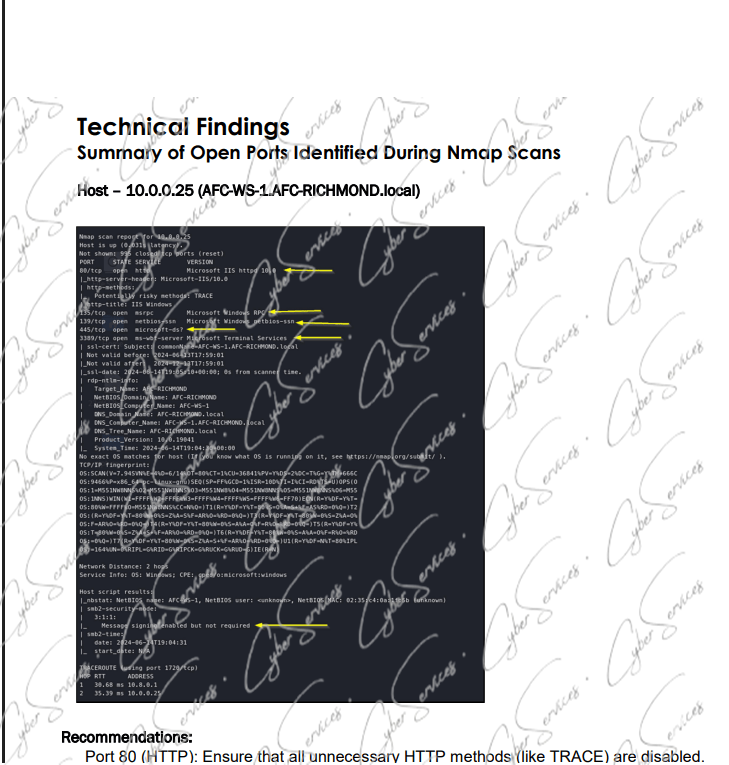
- 10.0.0.25 (AFC-WS-1.AFC-RICHMOND.local) → Workstation
- 10.0.0.35 (AFC-WS-2.AFC-RICHMOND.local) → Second workstation
- 10.0.0.225 (AFCR-DC.AFC-RICHMOND.local) → Domain Controller
- http://afc-richmond.local/ → Internal web application
- WDAGUtilityAccount → Default Windows sandbox account
This layout already suggests:
➡️ Web → User → Domain → Full compromise path
Starting Point: afc-richmond.local
The internal web app:
➡️ http://afc-richmond.local/
is usually where things begin.
Focus on:
- Login forms
- Input parameters
- Hidden endpoints
In PJPT scenarios, web apps often:
- Leak credentials
- Expose internal usernames
- Provide initial foothold
➡️ Even small hints here can unlock everything else.
AFC-WS-1 & AFC-WS-2: User-Level Access PJPT AFC Richmond guide
- AFC-WS-1 (10.0.0.25)
- AFC-WS-2 (10.0.0.35)
These machines are key for:
- Credential harvesting
- Lateral movement
- Local privilege escalation
Once you gain access to one workstation, check:
- Stored credentials
- Logged-in users
- Accessible shares
➡️ Movement between these two systems is usually expected.
WDAGUtilityAccount: Small Detail, Big Hint
The account:
➡️ WDAGUtilityAccount
is a built-in Windows account used for sandboxing.
In labs like PJPT, its presence can hint:
- Misconfigurations
- Weak permissions
- Potential local abuse paths
It’s not always directly exploitable—but it’s rarely random.
AFCR-DC: The Final Target PJPT AFC Richmond guide
- AFCR-DC.AFC-RICHMOND.local (10.0.0.225)
This is where everything leads.
To reach it, you typically need:
- Valid credentials
- Lateral movement
- Privilege escalation
Once here, you control:
- Domain authentication
- Users and policies
➡️ This is where higher flags (IPT-006 → IPT-008) usually sit.
IPT Flags Strategy (001 → 008)
The flags are designed to guide your progress:
- IPT-001 → IPT-002 → Initial enumeration / web
- IPT-003 → IPT-004 → Workstation access
- IPT-005 → IPT-006 → Credential movement
- IPT-007 → IPT-008 → Domain-level control
If you’re stuck, you’re likely skipping a step—not missing a trick.
Example Attack Flow PJPT AFC Richmond guide
- Enumerate afc-richmond.local
- Extract or guess credentials
- Access AFC-WS-1
- Move laterally to AFC-WS-2
- Harvest additional credentials
- Escalate privileges
- Access AFCR-DC
- Capture final flags
Common Mistakes PJPT AFC Richmond guide
- Ignoring the web app
- Not checking both workstations
- Missing credential reuse
- Jumping to DC too early
Final Insight
The PJPT AFC-RICHMOND scenario teaches a simple but important lesson:
➡️ Small findings lead to big access
Systems like AFC-WS-1, AFC-WS-2, and AFCR-DC, along with the web app and accounts like WDAGUtilityAccount, are all connected.
If you treat them separately, progress feels slow.
If you connect them, the path becomes obvious.
Vendor: https://certifications.tcm-sec.com/pjpt/
Get the material: PJPT exam material