
You are three weeks into HTB Academy, the tooling feels natural, and then it hits you: the exam isn’t a box. It’s a 10-day siege against an enterprise environment of roughly eight machines, and a commercial-grade report you have to upload before the same clock runs out. That’s the moment most candidates realize a CPTS study guide built around “can I pop the box” solves the wrong problem. The real question sitting in your chest isn’t whether you can get a shell. It’s whether you can chain the attack path across hosts, pivot into segments you can’t reach directly, capture at least 12 of 14 flags, and write all of it up to a passing standard before day ten expires.
This is a sequenced path — what to study, in what order, how to rehearse under real conditions, and how to walk in with your reporting workflow already built instead of improvised at hour 200. Structure beats volume here. Unstructured study is the failure mode that quietly ends more attempts than any single privesc you never found.

Table of Contents
- What the CPTS Exam Actually Demands Before You Open a Single Module
- Building Your CPTS Study Roadmap: The Module Sequence That Unlocks the Attack Chain
- How to Practice So Exam Day Feels Familiar, Not Novel
- The Report Is the Exam: Documentation Workflows That Actually Pass
- Curated Study Sheets vs. Scattered Prep: Choosing Your CPTS Study Stack
- A Time-Boxed CPTS Study Plan by Availability: Full-Time vs. 10 Hours a Week
- Your Two-Week CPTS Exam-Readiness Checklist
- CPTS Study Guide: Frequently Asked Questions
What the CPTS Exam Actually Demands Before You Open a Single Module
Rebuild your mental model before you touch a module. The CPTS is not a question bank and it is not a single-box challenge. The lab is accessible for ten days from the moment you enter, and the final report must be uploaded inside that same ten-day window, according to the HackTheBox CPTS overview. That deadline is not a soft target. If the report isn’t in by the time the window closes, the technical work behind it stops mattering.
The environment itself is a black-box enterprise network of roughly eight machines, a mix of Linux and Windows, with 14 flags distributed across the estate. Practitioner reviews from deephacking.tech and r3zz.io describe the pass condition as capturing at least 12 of those 14 flags, tied to a 100-point scoring model where 85 points clear the bar — and 12 flags roughly maps to that threshold. Hitting the flag count is necessary but not sufficient. You also submit a commercial-style report that must meet strict requirements. Miss the report standard and strong exploitation still fails.
There’s a logistics layer people ignore until it bites. According to Bruno Rocha Moura’s CPTS tips guide, each voucher grants two attempts. The second attempt must start within 14 days of receiving feedback from the first, and feedback itself can take up to 20 business days to arrive. Moura’s observation is blunt and useful: most people use both attempts, so the full experience can effectively span a roughly 20-exam-day arc with a break wedged in the middle. Plan for that reality instead of treating a first-attempt miss as the end of the road.
The distinction that matters most is how CPTS thinking differs from OSCP-style thinking. OSCP historically leans toward isolated boxes you solve independently. Deephacking’s review frames the CPTS as “essentially a big CTF” — but one built as a realistic enterprise scenario with chained attack paths and mandatory pivoting. You cannot treat the hosts as independent puzzles. A foothold on one machine exists to get you to the next. This is exactly the kind of Active Directory enumeration and pivoting the exam expects, where compromising one host is the prerequisite for even seeing the next target.
Anchor all of this against what penetration testing actually is. NIST, the U.S. government standards body, defines penetration testing as issuing real attacks on real systems using the same tools and techniques as genuine attackers — the exercise exists to test defenses realistically, not to quiz theory. The NIST Computer Security Resource Center glossary frames it that way deliberately. The CPTS is engineered to mirror that definition. It hands you an environment that behaves like a real engagement and asks you to behave like a real tester — enumerate, exploit, pivot, escalate, and then explain it to stakeholders who weren’t in the room.
The CPTS doesn’t test whether you can hack a box. It tests whether you can think in attack paths and prove it in writing.
Everything downstream in this guide assumes you now know the numbers: ten days, roughly eight machines, 14 flags, 12 to pass, 85 of 100 points, two attempts, a mandatory report. Those constants shape every study decision you’ll make.
Building Your CPTS Study Roadmap: The Module Sequence That Unlocks the Attack Chain
A good CPTS study guide sequences the HTB Penetration Tester job-role path by capability, not by topic label. HTB’s own path breakdown lists 28 modules in scalable difficulty and logical order, including nine simulated penetration tests and more than 270 targets to attack. You must complete the full curriculum — every exercise and assessment — before you’re eligible to enter the exam. That gate isn’t bureaucratic. The module order mirrors the dependency order of a real engagement, which is why working through it in sequence is itself training for the attack chain.
Here’s the sequence, framed by what each stage unlocks for exam day:
- Recon and enumeration foundations — This unlocks your ability to map the full external attack surface before you touch anything. The exam is black-box. Weak enumeration means you never find the foothold, and the entire chain collapses at step one. Slow down here; it pays back everywhere.
- Web exploitation — The most common initial foothold vector in the environment. This is what unlocks your entry into the network. If you can’t reliably land a web-based foothold, you’re stuck outside looking in while the clock burns.
- Service and host exploitation (Linux/Windows) — This converts a foothold into meaningful local access on a machine. You need fluency on both operating systems because the environment mixes them, and the flags don’t care which one you prefer.
- Privilege escalation — This unlocks the flags that require elevated context and sets up the pivots that follow. Root or SYSTEM on one host is rarely the goal itself — it’s the key to the next door.
- Active Directory attacks — This unlocks lateral movement across the Windows estate and is heavily weighted in the exam environment. AD is where isolated wins become a connected engagement. Kerberoasting, ACL abuse, and credential harvesting are not optional side reading.
- Pivoting and tunneling — This unlocks internal-only hosts that are unreachable from your entry point. This single mechanic is what turns eight separate boxes into one connected chain. Skip it and you’ll top out at the machines you can see, which won’t be 12 flags.
- Post-exploitation and documentation habits — This unlocks the evidence capture and note discipline you’ll lean on for the report. Every command logged and screenshot captured now is a finding you don’t have to reconstruct from memory on day nine.

Treat the sequence as scaffolding. Each stage assumes fluency in the one before it, exactly as a real engagement does. If you want to see a chained walkthrough in practice, our chained path walkthrough resources show how a foothold flows into privilege escalation and lateral movement rather than living as a standalone exploit.
How to Practice So Exam Day Feels Familiar, Not Novel
Failure on exams like this is usually a preparation-discipline problem, not a skill problem. CEH-focused prep sources — Vision Training Systems and ITU Online among them — report that many candidates fail for “avoidable reasons”: no consistent study routine, no simulation of real exam conditions with timers, and “resource overload” from juggling too many books, videos, and note sets without weekly goals. That diagnosis is exam-agnostic and lands hard on CPTS candidates who mistake activity for readiness.
Here’s how to rep so the exam feels like a Tuesday, not an ambush:
- Simulate the timeline, not just the boxes — Practice multi-host chains in a single sustained sitting instead of one-off box grinding. The exam rewards project stamina over sprint speed. r3zz.io’s review argues “10 days are enough” precisely because it’s a project, not a race — but only if you’ve trained your ability to work a long, connected engagement without burning out at hour 30.
- Practice pivoting deliberately — Build scenarios where the only route to a target runs through a host you’ve already compromised. This is the single mechanic that most separates CPTS from isolated-box exams. Drill tunneling until it’s muscle memory, because fumbling proxychains or an SSH tunnel under time pressure is where hours vanish.
- Take exam-format notes now — Capture findings, commands, and screenshots in the exact structure your report will need, starting today. Bruno Rocha Moura’s advice is to constantly ask “what would I do next?” at each step, which trains attack-path thinking and produces notes that map cleanly to a report later.
- Pre-build your tooling — Lock your loadout, scripts, and aliases before exam day. Time spent fixing a broken tool at hour 40 is time stolen directly from your report. Keep a reference pentest cheat sheet in reach so you’re not re-deriving syntax under pressure.
- Rehearse the boring parts — Loot organization, consistent screenshot naming, evidence-per-flag tracking. These unglamorous reps are what make reporting fast when you’re tired. A candidate who has practiced their evidence pipeline drafts findings in minutes; one who hasn’t spends day nine reconstructing what they did on day two.
For retention of dense material, active-learning techniques help: turning notes into questions, spaced repetition with flashcards, and the Feynman technique of explaining a topic in plain language, as covered in CEH study-technique guidance. Passive re-reading of module content is the weakest form of practice available to you.
The Report Is the Exam: Documentation Workflows That Actually Pass
Most CPTS failures are documentation failures, not exploitation failures. Practitioner reviews from deephacking.tech and r3zz.io warn repeatedly that candidates underestimate reporting time — strong exploitation with weak documentation still fails despite hitting many technical objectives. r3zz describes reporting as a major component of the effort and, inside his own 10-day window, spent roughly five days on exploitation and then dedicated a full day exclusively to the report. That ratio should reset your expectations. Reporting is not a victory lap. It’s a phase with its own budget.
Candidates who fail the CPTS rarely fail the hacking — they fail to prove it. The report is where points are won and lost.
The standards backbone here is CREST. Its penetration testing guidance calls reporting “a critical aspect” of the discipline and warns that poor reports undermine otherwise strong technical work, because stakeholders rely on clear, prioritized findings and remediation advice to make decisions. According to the CREST Guide for running an effective Penetration Testing programme, effective reporting ties directly to remediation of weaknesses, root-cause analysis, improvement programmes, and ongoing action-plan monitoring. That’s the bar the CPTS report is emulating — a document that drives decisions, not a log of what you typed.
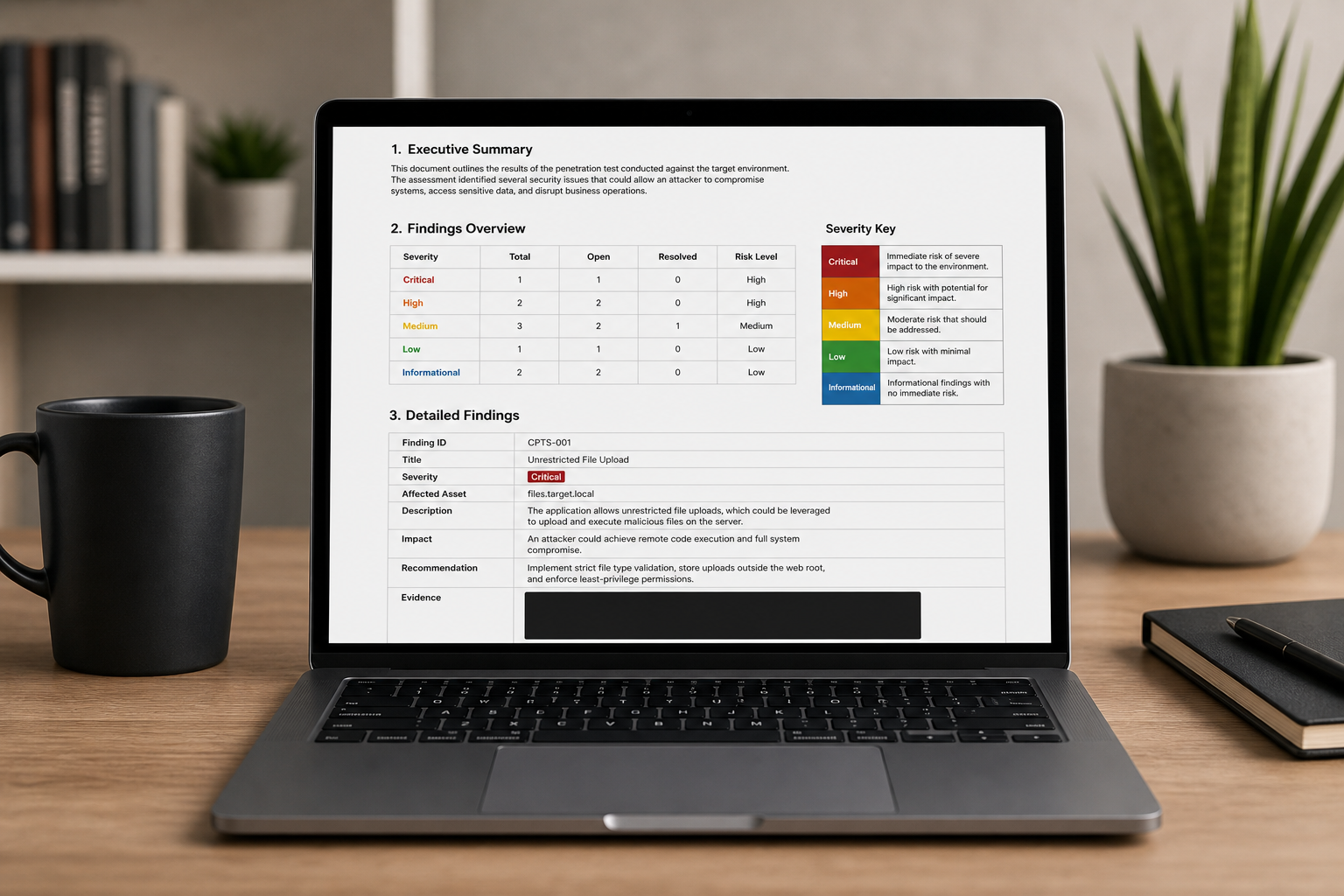
The NIST-aligned four-phase model reinforces the point. A common summary of that model — planning, discovery, attack, and reporting — treats reporting as an integral phase that documents vulnerabilities, potential impact, and remediation recommendations, not an afterthought bolted on at the end. VikingCloud’s guidance on penetration test reports makes the same argument from the stakeholder side: an effective report is structured around prioritized risks and practical next steps, not raw technical detail dumped onto a page.
Here’s the report anatomy to build before you ever enter the lab:
- Executive summary — A business-readable risk narrative for non-technical stakeholders. Short, prioritized, and free of jargon. This is often the only section a decision-maker reads in full.
- Technical findings — Each finding carries a severity rating, the affected host, reproduction steps, and supporting evidence. Consistency across findings matters as much as the content of any single one.
- Evidence capture discipline — Screenshots with context, command outputs, and timestamps, organized as one evidence set per flag. Evidence you can’t tie to a specific flag is evidence that doesn’t score.
- Remediation and root cause — Actionable, prioritized recommendations. This is what CREST explicitly demands, and it’s where you demonstrate you understand the vulnerability, not just the exploit that triggered it.
- Attack narrative — The chained path from initial foothold to final objective, showing you understood the whole engagement rather than a collection of isolated wins. This section is where the pivoting you drilled pays off in prose.
The practical lever for a fixed 10-day budget is a pre-built template. Because reporting can eat a full day, walking in with a locked structure converts report-writing from open-ended authoring into filling defined slots. The same discipline behind a strong OSCP write-up applies here — see our professional report template breakdown for the structure that makes drafting fast under a deadline. And draft during the engagement, not after. Write each finding as you capture its evidence so day nine is assembly and polish, not a panicked reconstruction of everything you did over the previous week.
Curated Study Sheets vs. Scattered Prep: Choosing Your CPTS Study Stack
How you assemble your prep materials matters as much as the hours you put in. CEH prep sources — Vision Training Systems and ITU Online — identify “resource overload” as a top failure cause: too many books, videos, and note sets with no weekly goals or topic clusters. They also note that studying random tools and memorizing isolated definitions fails when the exam demands task-oriented, objective-mapped skills. The CPTS punishes that pattern hard, because it’s a hands-on engagement, not a definitions quiz. HTB counters the overload problem structurally by offering a single, sequenced 28-module curriculum aligned to one hands-on outcome — the antidote to a fragmented stack.
| Dimension | Self-assembled notes | Scattered free PDFs/CTFs | Curated structured study sheets |
|---|---|---|---|
| Coverage completeness | Depends on the learner | Fragmented, gaps likely | Mapped to exam domains |
| Time cost to build | High | Medium (searching/sorting) | Low (ready to use) |
| Exam alignment | Variable | Often misaligned | Built around exam scenarios |
| Reporting support | Usually none | Rare | Templates included |
| Update currency | Manual upkeep | Often stale | Maintained/refreshed |
The right choice depends on your constraints. Self-assembled notes and scattered PDFs suit unlimited-time learners who genuinely enjoy the exploratory grind and treat building the notes as part of the learning. If you have months to spare and the act of curating your own material cements it in memory, that friction is a feature, not a bug. You’ll know your notes intimately because you wrote every line.
Curated structured study sheets suit a different profile: time-constrained working professionals and multi-cert red team operators who can’t afford detours. If you’re fitting CPTS prep around a full-time job, every hour spent hunting for a decent AD cheat sheet is an hour not spent drilling pivoting. Exam-aligned coverage plus reporting support out of the box removes the two most expensive forms of overhead — assembly and rework. The reporting-support row ties directly to the previous section: a stack that ships report templates compresses the single most time-expensive phase of the exam, converting a full reporting day into structured slot-filling. Operators stacking CPTS with red team certs like CRTO and Cobalt Strike-focused paths benefit most from pre-structured material, because the marginal cost of rebuilding notes for every certification compounds fast across a multi-cert year.
A Time-Boxed CPTS Study Plan by Availability: Full-Time vs. 10 Hours a Week
Your schedule is set by two fixed baselines. First, the full 28-module path — with its nine simulated tests and 270-plus targets — must be complete before you’re eligible for the exam. Second, the exam itself is a 10-day project, plus the possibility of a second attempt that, factoring in feedback delays Bruno Rocha Moura documents, can stretch the full cycle toward a roughly 20-day arc. Everything below works backward from those constants.
| Weekly availability | Realistic weeks to exam-ready | Primary weekly focus milestone |
|---|---|---|
| Full-time (35+ hrs) | 6–10 weeks | Full path + timed chained lab runs |
| Part-time (15–20 hrs) | 12–18 weeks | Path modules + weekend pivot drills |
| Limited (~10 hrs) | 20–28 weeks | Structured sheets + AD/pivoting priority |
These week ranges are planning estimates derived from the module-completion requirement and the practitioner “project-style” framing r3zz uses — treat them as guidance, not guarantees. Your baseline experience shifts them in either direction. A working sysadmin with years of Windows depth will move through the AD modules faster than a career switcher starting from fundamentals.
Where should the time-constrained professional compress? Three places. First, use curated, structured materials instead of exploratory study — the exploration is enjoyable but it’s the most expensive way to reach exam alignment, and you don’t have the budget for it. Second, skip building notes from scratch; adopt a structure that’s already mapped to exam domains and spend your saved hours on hands-on reps. Third, front-load Active Directory and pivoting, because those two carry the heaviest chain dependencies in the exam environment. A candidate strong on web exploitation but weak on pivoting can find a foothold and still fail to reach 12 flags, because the internal hosts stay unreachable. Limited time is survivable only if you eliminate detours ruthlessly.
Limited study time isn’t a disadvantage if your materials are already structured — it just means you can’t afford detours.
The part-time middle ground is where most working professionals actually live. Fifteen to twenty hours weekly, with weekends reserved for the sustained, timed chained runs that mirror exam conditions, gets you to readiness in a realistic window without demanding you quit your job. The weekday hours cover module progress; the weekend sessions build the project stamina that a spread-out study schedule otherwise erodes.
Your Two-Week CPTS Exam-Readiness Checklist
The final stretch is about verification, not new learning. If you’re two weeks out, every item below is a concrete action you either can or cannot check off. No half-measures.
- Lock your report template — Sections, severity scale, and evidence layout finalized before day one, so writing is slot-filling rather than authoring under a deadline.
- Verify your full tooling loadout — Every script, tunnel tool, and alias tested and confirmed working. No live debugging of your own environment during the exam.
- Drill one full chained attack path end-to-end — Foothold to privilege escalation to Active Directory to pivot, in a single timed sitting. If you can’t do it in practice, you won’t do it under exam pressure.
- Confirm your pivoting and tunneling workflow — Reach an internal-only host through a compromised jump box without hesitation. This is the mechanic that connects the environment; fluency here is non-negotiable.
- Test your evidence-capture system — Screenshot naming convention, per-flag folders, and command logging all functioning. Verify you can trace any screenshot back to the flag it supports.
- Rehearse the note-to-report flow — Take notes during a practice run, then draft a real finding from them. Confirm the pipeline works before it matters.
- Run the environment and VPN checks — Connection stability, credentials, and lab access all confirmed ahead of your start. A connectivity problem on day one is a self-inflicted wound.
- Map the flag budget — You need at least 12 of 14 flags, or 85 of 100 points, per deephacking and r3zz reviews. Know what “enough” looks like so you stop chasing marginal flags and start writing when you’ve cleared the bar.
- Plan your reporting day inside the 10-day window — Reserve at least a full day for the report. r3zz did exactly that after roughly five days of exploitation. Build the reservation into your plan before the exam starts.
- Confirm attempt logistics — You have two attempts. Know the 14-day and 20-business-day feedback timeline Bruno Rocha Moura documents, so a first-attempt miss becomes a planning problem instead of a panic.
Work down this list until every box is checked. Confidence on exam day isn’t a feeling — it’s the residue of verification you did in advance.
CPTS Study Guide: Frequently Asked Questions
How long does it realistically take to prepare for the CPTS?
It depends heavily on your baseline experience, but the fixed requirement doesn’t move: you must complete all 28 path modules, the nine simulated penetration tests, and 270-plus targets before you’re exam-eligible, per HackTheBox. Most candidates land in a multi-month range, driven mainly by how many hours per week they can commit and how much AD and Windows depth they bring in.
Do I need OSCP or prior certs before attempting the CPTS?
No hard prerequisite exists. The HTB Penetration Tester path is self-contained and scaffolds from fundamentals upward, so a motivated learner can start without a prior certification. That said, prior exposure to Active Directory and pivoting helps considerably, because those mechanics carry the exam’s chained attack path and are where under-prepared candidates lose the most ground.
What’s the most common reason candidates fail the CPTS?
Reporting. Deephacking and r3zz reviews repeatedly note that candidates underestimate reporting time and lose points despite solid exploitation. The secondary cause is unstructured study — the “resource overload” pattern CEH prep sources describe, where too many disconnected materials produce activity without exam-aligned skill. Both are preventable with discipline rather than more content.
Can I use my own notes and cheat sheets during the exam?
Yes — that’s the point. The CPTS is a 10-day, unproctored, project-style engagement, which a 0x3 Security walkthrough frames as deliberately designed to accommodate candidates with jobs, studies, and families. Your own notes, references, and report templates are exactly what you’re expected to bring. This is precisely why pre-building them is a legitimate, high-value preparation strategy rather than a shortcut.
How much of the exam is Active Directory versus web exploitation?
The environment mixes Linux and Windows across roughly eight machines with 14 flags, per deephacking and r3zz reviews. Web exploitation is a common initial foothold vector, and Active Directory drives the lateral movement that connects hosts. Both are essential — you can’t skip either. A web-only skillset gets you in the door but leaves you stranded before you reach 12 flags.