CPENT AI Exam Dump presents a broad practical assessment involving Active Directory, IoT firmware, binary analysis, CTF systems, and web application security.
CPENT AI Exam Dump provides a practical look at an enterprise-style assessment spanning Active Directory, IoT firmware, binary analysis, CTF systems, web applications, and AI-assisted security scenarios.
The reviewed environment contains 53 challenges across five ranges, with 47 recorded as completed and six marked as not attempted. Rather than focusing on a single attack type, the environment requires candidates to move between Windows domains, embedded systems, compiled binaries, Linux hosts, CMS platforms, and an AI-enabled web application.
The main ranges are:
| Range | Main Focus |
|---|---|
| Active Directory | RODCs, domain clients, credentials and authentication |
| IoT | Firmware extraction, embedded Linux and device configuration |
| Binary | Reverse engineering, memory safety and program analysis |
| CTF | Linux, Joomla, WordPress, SSH and privilege boundaries |
| Web / AI | Web enumeration, information disclosure and AI application security |
This article maps the major hosts and skills represented in the environment without providing passwords, flags, payloads, hashes, or complete step-by-step exam solutions.
CPENT AI Exam Environment at a Glance
The CPENT AI Exam Dump environment contains several distinct networks and technologies that should be treated as parts of a larger penetration-testing assessment.
Key systems include:
| Host / Device | IP Address | Role |
|---|---|---|
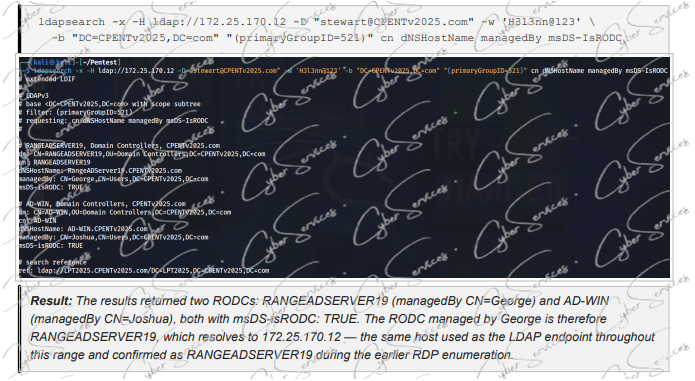
| RANGEADSERVER19 | 172.25.170.12 | Read-Only Domain Controller |
| AD-WIN | 172.25.170.50 | Read-Only Domain Controller |
| Windows11.CPENTv2025.com | 172.25.170.140 | Domain client |
| Writable DC target | 172.25.170.200 | Active Directory infrastructure |
| IoT Target 1 | 172.25.120.110 | Firmware analysis |
| IoT Target 2 | 172.25.120.100 | Firmware analysis |
| Binary Targets | 172.25.65.103 / .105 / .165 | Reverse engineering |
| Ticketing Portal | 192.168.200.106 | Linux / web target |
| Joomla Server | 192.168.200.127 | CMS / SSH |
| WordPress Server | 192.168.200.232 | CMS / Linux |
| ChatOps AI | 10.10.1.111 | AI-assisted web application |
| DSP-W215 | 192.168.0.60 | Device record from firmware |
The important skill is not memorizing these addresses. Candidates need to understand what each system represents, what information it can expose, and how findings from one area can influence another.
Active Directory Range: CPENTv2025.com
The Active Directory range centers on CPENTv2025.com and combines Domain Controllers, RODCs, Windows endpoints, users, authentication data, and replication policies.
RANGEADSERVER19 at 172.25.170.12 and AD-WIN at 172.25.170.50 represent Read-Only Domain Controllers, while Windows11.CPENTv2025.com at 172.25.170.140 provides the workstation side of the environment. A writable Domain Controller target is associated with 172.25.170.200.
Important areas include:
- RODC identification and management
- Password Replication Policies
- cached domain credentials and MsCacheV2
- NTLM and Kerberos concepts
- SAM account names
- LDAP information
- domain users and groups
- Windows endpoint authentication
- administrative relationships
RODC security is particularly useful because it demonstrates that simply identifying a Domain Controller is not enough. You also need to understand which credentials can be cached, who manages the server, and how the RODC relates to more privileged domain infrastructure.
The Windows 11 endpoint adds another layer. Workstations can contain cached authentication data, user files, browser sessions, internal hostnames, registry information, and evidence of previous domain activity. This makes endpoint enumeration directly relevant to wider Active Directory security.
Want the Complete CPENT Preparation Material?
If you’re preparing for CPENT and want to avoid piecing together every range from scattered resources, our CPENT exam material combines practical walkthroughs, lab sets, and reporting resources in one place.
Instant delivery · Free updates · CPENT-focused practical material
→ Get the CPENT Exam Material
IoT Firmware Analysis Range
The IoT section of the CPENT AI Exam Dump moves away from traditional Windows and web penetration testing into embedded systems.
The primary targets are:
172.25.120.110
172.25.120.100
Firmware samples represented in the environment include IOT.bin, IOT2.bin, IOT3.bin, IOT4.bin, IOT5.bin, IOT6.bin, FileOne.bin, and FileTwo.bin.
The practical focus includes:
- firmware extraction
- CPU architecture identification
- embedded Linux
- JFFS2 and other filesystem structures
- firmware offsets
- BusyBox and compiler information
- root account information
- device configuration
- network settings
- hardware identifiers
Firmware should never be treated as one opaque binary file. A firmware image can contain bootloader data, kernels, compressed filesystems, configuration databases, certificates, startup scripts, network information, and authentication data.
The DSP-W215 record associated with 192.168.0.60 is a useful example of why extracted firmware deserves detailed analysis. Embedded databases and configuration files can reveal device names, internal addresses, network settings, users, and historical operational information.
Binary Analysis and Reverse Engineering
Three targets form the main binary-analysis section:
172.25.65.103
172.25.65.105
172.25.65.165
Rather than simply crashing applications, this range tests whether you understand why program behavior changes and what the security impact could be.
The represented concepts include:
- static and dynamic analysis
- validation algorithms
- executable control flow
- hexadecimal values and calculations
- stack layouts
- memory offsets
- return addresses
- unsafe input handling
- hidden functions
- instruction-pointer behavior
- memory corruption
For example, recognizing a known validation algorithm can help distinguish normal application logic from an actual security control. Likewise, a crash becomes useful only when you can determine which memory region was affected, whether execution flow changed, and which mitigations are present.
This makes binary analysis one of the areas where methodology matters more than memorized commands.
CTF Range: Linux, Joomla and WordPress
The CTF portion combines several technologies rather than focusing on a single platform.
The main systems are:
192.168.200.106 — Ticketing Portal192.168.200.127 — Joomla192.168.200.232 — WordPress
The ticketing environment introduces application databases, authentication, uploads, SSH keys, Linux permissions, and privilege boundaries. Ticketing systems are particularly interesting because they can combine user data, attachments, internal notes, application credentials, and backend infrastructure.
The Joomla target shifts the focus toward CMS identification, extensions, administrative access, server configuration, and SSH security.
The WordPress environment combines Apache, plugins, user authentication, filesystem permissions, and Linux security.
The important lesson is that identifying a CMS version is only the beginning.
A WordPress or Joomla deployment may still expose risk through:
- vulnerable or abandoned extensions
- weak administrative credentials
- exposed configuration
- insecure uploads
- excessive filesystem permissions
- SSH key exposure
- poor server hardening
The CPENT AI Exam Dump therefore rewards candidates who examine the entire application stack instead of searching only for a CMS exploit.
Web & AI Range: ChatOps at 10.10.1.111
The web range introduces 10.10.1.111, where a ChatOps AI application adds an AI-specific dimension to conventional web enumeration.
The environment connects this target with areas such as:
- web server enumeration
- AI chatbot information disclosure
- sensitive application data
- supervisor information
- legacy keyset logs
- hidden or sensitive files
- application access controls
AI-assisted applications introduce an important security principle: the model itself should never be treated as the security boundary.
If an AI interface can access internal systems or sensitive information, authorization must still be enforced by the backend application.
Sensitive information may include:
- employee identities
- credentials
- API keys
- internal files
- administrative instructions
- operational data
- private logs
Prompt-level restrictions alone are not a replacement for server-side authorization.
This is one of the areas that makes the current CPENT AI environment particularly relevant to modern penetration testing.
Save Time on CPENT Preparation
CPENT covers a wide technical range—from Active Directory and IoT to binary analysis, web exploitation, pivoting and reporting. If your goal is to prepare efficiently, you can use our complete CPENT exam material instead of building every part of your preparation separately.
Walkthroughs · Lab sets · Reporting resources · Instant delivery
→ Explore CPENT Exam Material
Skills Covered by the CPENT AI Exam Dump
Taken together, the five ranges cover a broad practical skill set:
Enterprise & Active Directory: domain enumeration, RODCs, Password Replication Policies, Kerberos, NTLM, cached credentials, Windows endpoints and privilege relationships.
IoT: firmware extraction, embedded Linux, filesystems, device configuration and firmware security.
Binary Analysis: reverse engineering, program flow, stack behavior, memory corruption and executable analysis.
Web & Linux: Joomla, WordPress, authentication, SSH, uploads, server permissions and privilege boundaries.
AI Security: chatbot information disclosure, backend authorization and sensitive-data exposure.
Professional Pentesting: evidence collection, host mapping, documentation and reporting.
This broad coverage matches the way EC-Council currently positions CPENT AI: an advanced penetration-testing program involving enterprise networks, IoT systems, segmented environments, binary exploitation, pivoting and reporting.
For the official certification scope and current program details, see the EC-Council Certified Penetration Testing Professional (CPENT AI) page.
CPENT AI Exam Dump FAQ
How many challenges are represented in this CPENT AI Exam Dump?
The reviewed report contains 53 challenges across five ranges, with 47 recorded as completed and six marked as not attempted.
What does the Active Directory range contain?
The environment includes RANGEADSERVER19, AD-WIN, Windows11.CPENTv2025.com, and a writable Domain Controller target, covering RODCs, authentication, cached credentials and domain relationships.
Does CPENT AI include IoT and binary analysis?
Yes. The represented environment includes dedicated firmware-analysis systems and three binary-analysis targets covering embedded systems, reverse engineering and memory-safety concepts.
Is AI security represented in the environment?
Yes. 10.10.1.111 hosts a ChatOps AI application associated with web enumeration and sensitive-information exposure.
Does this guide provide complete exam answers?
No. This guide maps the environment, technologies and practical skill areas without publishing passwords, flags, hashes, payloads or complete step-by-step solutions.
Final Thoughts
The CPENT AI Exam Dump demonstrates why CPENT preparation cannot be reduced to learning a single exploitation workflow.
The CPENTv2025.com environment tests Active Directory reasoning. The IoT range requires firmware and embedded Linux knowledge. The binary targets introduce reverse engineering and memory safety. Joomla, WordPress and the ticketing portal move the assessment into web and Linux security, while 10.10.1.111 introduces the security implications of AI-assisted applications.
The common skill across all five ranges is correlation: understand the asset, identify its role, collect evidence, determine how it relates to the surrounding environment, and document the result clearly.
Ready to Prepare for CPENT?
Get the complete CPENT exam material with practical walkthroughs, lab sets and reporting resources designed to reduce the time spent searching for fragmented preparation material.
✓ Instant digital delivery
✓ Free updates included
✓ Practical CPENT-focused resources
✓ Multiple CPENT preparation options available
Buy this dump:
Vendor: https://www.eccouncil.org/train-certify/certified-penetration-testing-professional-cpent/
See other certs: https://cyberservices.store/