
An effective oscp exam preparation checklist does one thing that generic study lists never do: it ties every task directly to how OffSec scores and structures the OSCP+ exam, so you walk into your 24-hour lab with a plan built around points, not hope. The real question is not whether you can study harder. It is whether you can reliably hit at least 70 points and submit an acceptable report inside a proctored, VPN-based environment on Kali Linux, within the time and energy you actually have. We build our OSCP support around that scoring reality, and this guide shows you how to do the same.
Table of contents
The real decision behind your OSCP checklist
OSCP+ is a fully practical, remotely proctored penetration test. You must reach at least 70 points and submit an acceptable report to pass, and you have 23 hours and 45 minutes to do it inside a VPN-based lab, typically attacking from Kali Linux. That single constraint reframes preparation from open-ended learning into a targeted readiness question.
There are no formal prerequisites to register, but OffSec strongly recommends prior experience with Linux and Windows administration, TCP/IP networking, scripting, and basic Active Directory before you sit the exam. Skipping that foundation is the most common reason strong-looking candidates stall on exam day.
So the decision your checklist has to force is concrete: are you ready to register for PEN-200 and schedule OSCP+ based on your current skill, or do you need to close specific gaps first? And separately, do you want to assemble every study asset yourself, or lean on mentor-supported, exam-aligned resources to compress the timeline? For time-constrained professionals, that second choice is where weeks of unfocused lab time get reclaimed. Our OSCP exam support services exist precisely for candidates who want to practice against likely exam patterns instead of building materials from scratch.
How OSCP+ exam mechanics should drive your checklist
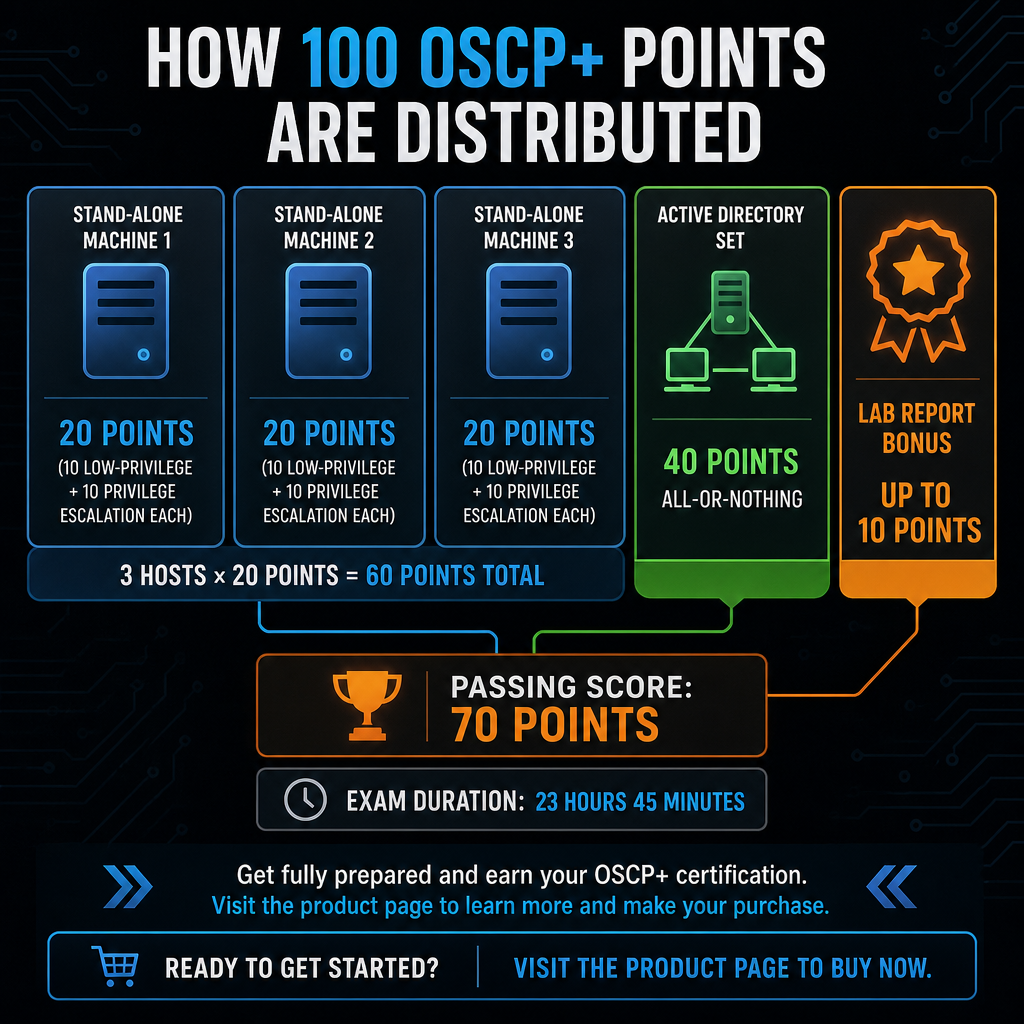
Every item on a serious checklist should trace back to the scoring model. The OSCP+ exam distributes 100 points across stand-alone machines and an Active Directory domain set. Up to 60 points come from three stand-alone targets, where each host typically awards 10 points for low-privilege access and 10 for privilege escalation, or 20 points per machine. The remaining 40 points come from compromising an AD environment of one domain controller and two clients through a full exploit chain, and partial progress in the domain set yields no points at all.
That all-or-nothing AD structure changes how you should allocate practice time. A domain compromise you can finish 80 percent of the way is worth zero, while a clean stand-alone root is worth a guaranteed 20. OffSec also awards up to 10 bonus points for a detailed lab report tied to PEN-200 machines and exercises, which can decide borderline results.
Given that math, your technical checklist should prioritize reliable AD initial access, lateral movement, and domain compromise; consistent privilege escalation on both Linux and Windows stand-alone hosts; a repeatable approach to buffer overflow, since a BO machine may or may not appear in your set; and a reporting routine you can actually execute while tired.
Proctoring, environment, and allowed tools
Because the exam is remotely proctored, several non-technical requirements belong on the list. OffSec expects a host system meeting minimum specifications such as a 64-bit dual-core CPU, 8 GB RAM recommended, adequate disk space, and a supported OS and browser. A stable internet connection with at least 20 Mbps download and 10 Mbps upload is required to hold VPN connectivity and screen sharing throughout the session.
You must present a physical, valid, government-issued photo ID in English that clearly shows your full name, photograph, year of birth, country of issuance, and validity dates, and you must be able to display both front and back to the proctor. OffSec permits all tools that do not perform restricted actions, but you must respect limitations on automation, exploit sources, and collaboration. Verify hardware, OS, browser, and network against the proctoring FAQ; test your webcam and VPN in advance; prepare a compliant ID; and curate a trusted toolset that stays inside the allowed-tools policy.
Many candidates reach this stage and choose to supplement their own checklist with resources tuned to the current OSCP+ format. We position ourselves as a premium provider for OffSec exams, and our OSCP resources are aligned to the same scoring and content model described above, so you spend your hours practicing rather than researching what to practice.
Turning the blueprint into a working checklist
Because OSCP measures applied skill rather than memorization, organize your checklist around domains of competence, not vague topics. A structure that maps cleanly to the exam has five parts: technical coverage, lab and practice coverage, environment and logistics, reporting and documentation, and exam strategy with risk management.
Technical coverage
PEN-200 and multiple OSCP guides stress comfort with Linux and Windows administration basics, TCP/IP fundamentals, scripting in Bash or Python, and foundational Active Directory before the exam. Translate that into pointed questions you can honestly answer yes or no to:
- Can you reliably enumerate and exploit common web vulnerabilities, misconfigurations, and custom services on Linux and Windows hosts?
- Have you practiced privilege escalation on both operating systems without relying solely on automated scripts?
- Can you build and modify exploits, including simple buffer overflows, using techniques that stay within OffSec’s restrictions?
- Have you completed AD labs that mimic the OSCP+ domain set, practicing initial compromise, credential extraction, lateral movement, and domain dominance?
Candidates with limited time rarely benefit from exploring every possible technique. Our broader catalog of OffSec-oriented resources, including material for adjacent exams, concentrates on the specific exploit chains and escalation patterns that surface in real certification environments, which keeps your prep aligned with realistic OSCP scenarios instead of scattered lab work.
Lab and practice coverage
OffSec’s own documentation ties bonus points to lab reporting, a clear signal of how heavily it weighs hands-on practice. For this part of the checklist, confirm you have completed a representative cross-section of PEN-200 labs, especially AD and multi-step exploit chains. Track the number and difficulty of stand-alone machines you have rooted, and make sure you can move from enumeration to initial access to escalation under time pressure. Record which environments you have documented thoroughly, because those write-ups double as report practice.
If building and tracking this practice portfolio is hard to fit around a job, mentor-based support helps. As an OSCP provider within our OffSec service list, we offer structured exam resources that expose candidates quickly to likely exam-style challenges while guiding how to document and generalize each solution for the report. When you are ready to see how we structure that support, our OSCP exam support services page lays out the scope.
Environment, logistics, and reporting items you cannot skip
A surprising share of OSCP failures come from non-technical problems: unstable networks, incomplete ID checks, or weak reporting despite solid technical progress. These items deserve the same rigor as your exploitation practice.
For environment and logistics, confirm that your exam workstation meets or exceeds the minimum hardware and OS requirements and is tested for screen-sharing and VPN stability. Stress-test your internet connection for long-running VPN sessions so an intermittent drop does not derail your run. Confirm your ID is valid, in English, and legible on webcam so there is no delay starting the session.
Reporting is where technically capable candidates most often lose a pass they had already earned on the machines. Passing requires clear, professional documentation of findings and attack paths, not just crossing 70 points. Preparation guidance for OffSec certifications emphasizes practicing detailed, reproducible reports that capture enumeration steps, exploitation details, privilege escalation methods, and remediation recommendations. Build these habits before exam day:
- Keep a reusable report template that matches OffSec’s expectations for structure and content.
- Take screenshots and notes during every lab so you can reconstruct full attack chains accurately after long sessions.
- Run at least a few mock exams where you simulate the 23h45 window, execute end-to-end chains on multiple machines, and produce a final report under time constraints.
Combining technical practice with report writing is exactly where time-constrained professionals struggle. Our mentor-supported approach is designed to shorten that curve with structured examples and guidance on presenting exploits effectively for reviewers, while still keeping the emphasis on hands-on work.
Decision criteria and the risks that fail strong candidates
Use your finished checklist to make decisions, not just to tick boxes. The criteria below turn the blueprint into a go or wait call.
| Decision factor | Ready to schedule | Not yet |
|---|---|---|
| Baseline skills | Confident in Linux/Windows admin, networking, scripting, AD basics | Gaps in one or more foundations |
| Practice depth | Fully compromised several multi-host and AD environments | Few or no full AD chains completed |
| Reporting ability | Produce clear, reproducible reports on demand | Struggle to document attack paths |
| Time availability | Consistent daily study blocks | Fragmented schedule, little study time |
| Financial tolerance | Comfortable absorbing a possible retake | Retake cost and delay would hurt |
The risks worth naming explicitly are the ones that sink otherwise strong performances. Underestimating AD by treating the domain set as just another machine ignores its all-or-nothing scoring. Ignoring bonus points forces you to rely entirely on exam-day results with no margin. Being technically capable but disorganized in documentation can produce a failing score despite multiple compromises. And proctoring issues from inadequate hardware, unstable internet, or ID problems can waste time or force a reschedule.
Because of these risks, many time-constrained IT and security professionals look for a path that combines authoritative coverage of OffSec’s requirements with practical focus in lab selection, exploit priorities, and reporting patterns. That is where we position our OSCP support: mentor-guided, instant-delivery resources aimed at aligning you quickly with the exam’s scoring and content model. If your checklist shows real gaps in time or practice depth, the fastest safe move is to tell us your target date and current skill level so we can point you at the right resources through our OSCP exam support services, rather than gambling on learning during the exam itself.
Worth reading alongside this checklist: our breakdown of the best study resources for the OSCP exam, a step-by-step OSCP preparation guide, and, if you are still weighing credentials, CPTS versus OSCP and which to choose.
Frequently Asked Questions
How long should I prepare for OSCP+ if I already work in penetration testing?
Experienced testers with solid Linux/Windows, networking, scripting, and some AD exposure often prepare for several weeks to a few months, depending on how many PEN-200 and AD-style labs they finish before scheduling. Shorter timelines are possible when your checklist shows comprehensive coverage and you use targeted, OSCP-style practice.
Do I need PEN-200 to sit the OSCP exam?
OSCP is closely tied to OffSec’s PEN-200, which provides the primary training and lab environment. Some sources note there are no formal prerequisites, but OffSec markets PEN-200 as the foundational path and integrates its labs and reporting into the bonus-point system, making it the practical prerequisite for most candidates.
How important are the OSCP lab bonus points?
A detailed lab report can grant up to 10 bonus points, which can lift a borderline result over the 70-point threshold. For candidates expecting strong but not perfect exam performance, those points meaningfully reduce the risk of failing and paying for a retake.
What technical areas cause the most trouble on the current OSCP+ exam?
Active Directory exploitation, Windows privilege escalation, and buffer-overflow-style exploit construction are the recurring pain points. Weakness in any of these tends to show up directly as lower scores on the AD set or specific stand-alone machines.
What non-technical items should I verify before exam day?
Confirm your workstation meets OffSec’s proctoring hardware and OS guidelines, your browser and VPN work reliably, your internet connection can sustain a full-day session, and your ID is valid, in English, and legible on webcam. Handling these early prevents delays or interruptions during the proctored exam.