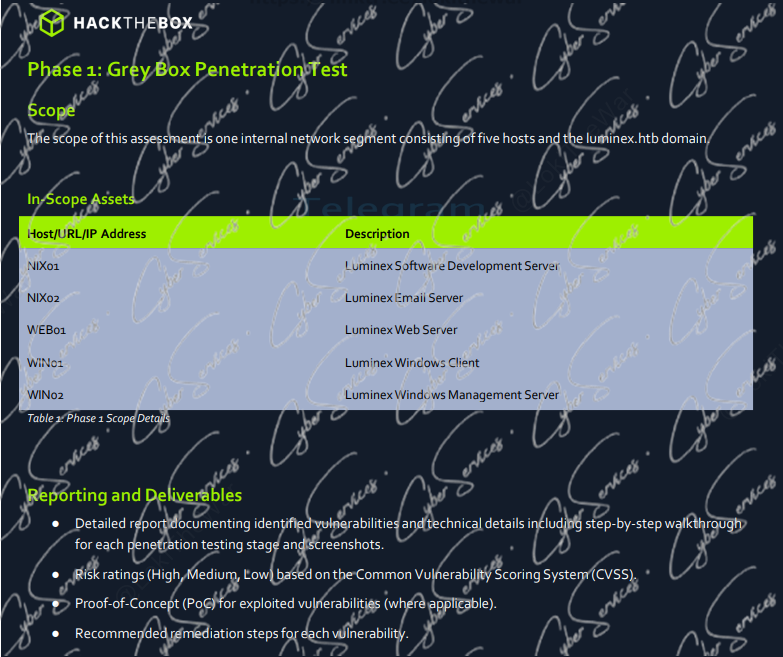
The CJCA Luminex Guide focuses on a core skill required when analyzing a mixed enterprise environment: connecting hosts, users, services, authentication activity, and security telemetry instead of treating every finding in isolation.
The Luminex Ltd. environment includes Linux and Windows systems, a public-facing web server, TeamCity infrastructure, user accounts, and ELK01 for centralized security monitoring. Together, these assets create an environment where enumeration and log correlation are equally important.
The objective is not simply to identify suspicious activity. You need to understand how that activity moves through the environment and build an evidence-based attack narrative.
Understanding the Luminex Environment
Luminex represents a multi-host corporate environment containing several systems with different roles.
Important assets include:
NIX01— Linux systemNIX02— Linux systemWEB01— web-facing infrastructureWIN01— Windows systemWIN02— Windows systemTeamCity— CI/CD infrastructureELK01— centralized logging and security analysis
You may also encounter users such as:
johnmarccameronsfishermelissajenkinskimkiarateamcity
A list of systems and usernames is only the beginning.
The real value comes from identifying relationships between them.
Start With an Asset Map CJCA Luminex Guide
Before drawing conclusions, create an inventory of the environment.
For each asset, record:
Host → Service → User → Authentication → Event → Related Host
This makes later correlation considerably easier.
For example, discovering activity associated with the teamcity account should immediately lead to questions such as:
- Which host generated the activity?
- Which system authenticated the account?
- What happened immediately before the authentication?
- What happened afterward?
- Did the same account appear elsewhere?
- Does ELK01 contain corresponding events?
The CJCA Luminex Guide methodology is based on repeatedly asking these questions.
WEB01 and the Initial Attack Surface
WEB01 represents an important starting point because externally reachable applications frequently generate the earliest observable evidence of an attack.
Begin by examining web activity for:
- unusual HTTP requests
- suspicious parameters
- unexpected POST requests
- authentication anomalies
- file uploads
- command execution indicators
- unusual user agents
- repeated requests to sensitive paths
- unexpected response codes
Avoid examining individual events without context.
A suspicious HTTP request becomes much more significant when followed by authentication or process activity on another host.
A useful investigation sequence is:
Suspicious web request
↓
Application activity
↓
Process execution
↓
Credential activity
↓
Internal authentication
↓
Additional host activity
This turns individual events into an attack narrative.
TeamCity Analysis in Luminex
TeamCity deserves special attention because CI/CD infrastructure can interact with source code, build systems, automation processes, credentials, and multiple internal hosts.
Do not assume that the presence of TeamCity automatically indicates compromise.
Instead, investigate its relationships.
Look for:
- TeamCity authentication events
- unusual login sources
- unexpected account activity
- build activity
- unusual job execution
- authentication from previously unrelated hosts
- activity associated with the
teamcityaccount - access to internal systems following TeamCity activity
The important question is not:
“Is TeamCity vulnerable?”
For an investigation, a better question is:
“What activity involving TeamCity occurred, and what happened immediately before and after it?”
Correlating TeamCity Activity
Suppose you observe activity involving TeamCity and later identify unusual events on NIX01.
Do not automatically assume the two are connected.
Build the timeline first.
For example:
WEB01 activity
↓
TeamCity authentication
↓
TeamCity-related execution
↓
NIX01 activity
↓
Additional authentication
If timestamps, accounts, source addresses, and related telemetry support the sequence, the relationship becomes much stronger.
Correlation should come from evidence rather than assumptions.
NIX01 and NIX02 Enumeration
NIX01 and NIX02 represent Linux systems within the Luminex environment.
When investigating Linux hosts, useful telemetry may include:
- SSH authentication
- failed login attempts
- successful login events
- sudo activity
- process execution
- shell commands
- scheduled tasks
- service activity
- file modifications
- network connections
Authentication context is particularly valuable.
Ask:
Who authenticated?
Where did they authenticate from?
Was that behavior normal for the account?
What processes followed the login?
Did the same user appear on another host afterward?
This is more useful than analyzing each Linux event independently.
Detecting Movement Between Systems
One of the most important skills in Luminex is recognizing when activity moves from one system to another.
Imagine finding:
WEB01 → suspicious activity
followed by:
NIX01 → authentication
followed by:
WIN01 → same user
These events may initially appear unrelated.
Once correlated by timestamp, account, source IP, and surrounding activity, they may reveal a broader sequence.
Build timelines such as:
Host A
↓
Credential or identity
↓
Host B
↓
Process/activity
↓
Host C
The objective is to reconstruct what happened across the environment.
WIN01 and WIN02 Analysis
Windows hosts introduce another important source of telemetry.
When investigating WIN01 and WIN02, pay attention to:
- successful logons
- failed logons
- process creation
- service creation
- PowerShell activity
- remote access
- unusual parent-child process relationships
- account privilege changes
- suspicious network connections
Authentication events become particularly useful when correlated with activity on Linux or TeamCity infrastructure.
For example:
TeamCity account activity
↓
Authentication to another system
↓
Windows logon
↓
Process creation
That sequence is much more informative than a single successful Windows logon.
User and Account Correlation CJCA Luminex Guide
Accounts such as john, marc, cameron, sfisher, melissajenkins, kimkiara, and teamcity should not simply be collected as usernames.
Build an identity map.
Record:
User → Host → Authentication Source → Timestamp → Activity
This makes unusual behavior easier to recognize.
If a user normally appears on one endpoint but suddenly authenticates across several unrelated systems, investigate the change.
Similarly, service accounts deserve additional attention when they appear on endpoints where their activity would be unexpected.
Account context matters.
A successful login is not automatically malicious.
An unexpected login followed by suspicious execution may be.
ELK01: Centralizing the Investigation
ELK01 is one of the most important assets in the CJCA Luminex Guide because it provides centralized visibility across the environment.
Instead of analyzing each host independently, use ELK01 to correlate events.
Useful dimensions include:
- timestamp
- hostname
- source IP
- destination IP
- username
- process
- event type
- authentication result
- service
- network activity
Start broad and progressively narrow the investigation.
If you begin with an alert, investigate activity surrounding the alert rather than looking only at the triggering event.
Ask:
What happened before the alert?
What happened immediately afterward?
Did the same user appear elsewhere?
Did the same source IP interact with another host?
Did another system record related activity?
This surrounding context often determines whether an alert represents malicious activity or legitimate behavior.
Building an Investigation Timeline
A timeline is one of the most effective ways to understand the Luminex environment.
A simplified example might look like:
10:04 → unusual request on WEB01
10:07 → authentication involving TeamCity
10:11 → activity appears on NIX01
10:15 → user authentication on WIN01
10:18 → suspicious process activity
The timestamps alone do not prove an attack.
But they give you a structure for further investigation.
Now correlate:
- source addresses
- usernames
- destination systems
- processes
- authentication events
- related logs
The stronger these relationships become, the more confidently you can reconstruct the sequence.
True Positive vs. False Positive Analysis
An important defensive-analysis skill is determining whether an alert represents genuinely malicious behavior.
Do not classify an alert based solely on its name.
Instead examine the underlying evidence.
For every alert, document:
Alert
↓
Triggering Event
↓
Related Logs
↓
User/Host Context
↓
Supporting or Contradicting Evidence
↓
Classification
A true positive should be supported by evidence showing malicious or unauthorized behavior.
A false positive should also be supported by evidence explaining why the activity was legitimate or incorrectly detected.
The conclusion matters, but the reasoning behind it matters more.
Avoid Tunnel Vision When Investigating Alerts
A common mistake is spending too much time investigating only the host named in an alert.
An alert generated on WIN01 may have originated from activity that began elsewhere.
Expand the investigation.
Search for:
- the same username
- the same source IP
- nearby timestamps
- related destination systems
- associated processes
- authentication attempts
- TeamCity activity
- WEB01 requests
Think horizontally across the environment.
Build the Luminex Attack Narrative
After collecting enough evidence, convert individual events into a coherent narrative.
A conceptual sequence could look like:
External Interaction
↓
WEB01 Activity
↓
Credential or Account Activity
↓
TeamCity Interaction
↓
NIX01 / NIX02 Activity
↓
Cross-Host Authentication
↓
WIN01 / WIN02 Activity
↓
ELK01 Correlation
This is an investigation model rather than a claimed exact solution sequence.
Your conclusions should always be based on the evidence available in the environment.
Enumeration Is Not Only an Offensive Skill
Enumeration is commonly associated with penetration testing, but the same mindset is extremely useful during defensive investigations.
An attacker asks:
What systems exist?
A defender asks:
Which systems were involved?
An attacker asks:
Which users can access this host?
A defender asks:
Which users accessed this host?
An attacker asks:
Where can these credentials be used?
A defender asks:
Where were these credentials used?
The questions are closely related.
The difference is perspective.
A Better CJCA Luminex Workflow
Use a repeatable process when investigating the environment.
1. Identify the Trigger
Start with the alert, suspicious event, or initial indicator.
2. Identify the Host
Determine which system generated the event.
3. Identify the User
Find the account associated with the activity.
4. Establish the Timeline
Examine events before and after the trigger.
5. Expand Across Hosts
Search for the same user, source IP, process, or related activity elsewhere.
6. Investigate TeamCity
Determine whether CI/CD activity is connected to the timeline.
7. Correlate Linux and Windows Events
Do not investigate NIX and WIN systems independently if evidence connects them.
8. Use ELK01 for Correlation
Combine authentication, host, process, and network telemetry.
9. Validate the Alert
Determine whether the available evidence supports a true-positive or false-positive classification.
10. Document the Narrative
Explain what happened, which systems were involved, and which evidence supports your conclusion.
Common Luminex Investigation Mistakes
Looking at Only One Log
One event rarely explains an entire incident.
Expand around the timestamp and search related hosts.
Treating Every Alert as Malicious
An alert is a starting point for investigation, not proof of compromise.
Ignoring Normal User Behavior
Understanding expected activity helps identify what is actually unusual.
Ignoring Service Accounts
Accounts associated with automation or infrastructure may provide important context when they appear unexpectedly.
Investigating Hosts Independently
Cross-host correlation is essential in multi-system environments.
Ignoring Events Before the Alert
The activity that caused an alert may have started minutes or even hours earlier.
Focusing Only on IP Addresses
Users, processes, hostnames, services, and timestamps can provide stronger correlation points.
CJCA Luminex Investigation Checklist
When working through Luminex, repeatedly ask:
- What triggered the investigation?
- Which host generated the event?
- Which account was involved?
- Where did the activity originate?
- What happened immediately before it?
- What happened afterward?
- Does the same user appear elsewhere?
- Does the same source IP appear elsewhere?
- Is TeamCity involved?
- Are NIX01 or NIX02 involved?
- Are WIN01 or WIN02 involved?
- What does ELK01 show?
- Does the evidence support a true positive?
- Can the events be connected into a coherent timeline?
If you cannot answer these questions, continue investigating before reaching a conclusion.
Why Luminex Matters for CJCA Preparation
HTB CJCA combines foundational offensive and defensive cybersecurity skills.
That makes an environment like Luminex particularly useful because understanding the attacker’s possible path helps you investigate the defender’s evidence.
The goal is not merely to find alerts.
You need to understand:
what happened,
where it happened,
which identities were involved,
how activity moved between systems,
and
what evidence supports your conclusion.
This is why the CJCA Luminex Guide methodology emphasizes correlation rather than isolated indicators.
For the current certification scope and requirements, refer to the official Hack The Box Certified Junior Cybersecurity Associate (HTB CJCA) certification page.
CJCA Luminex FAQ
What is Luminex in CJCA?
Luminex is a multi-system environment associated with CJCA analysis where activity across web, Linux, Windows, CI/CD, and logging infrastructure must be correlated to understand the broader security narrative.
Why is TeamCity important in Luminex?
TeamCity represents CI/CD infrastructure that may interact with users, automation, internal systems, and other services. Investigating authentication and activity around TeamCity can help identify relationships between events occurring across multiple hosts.
What is ELK01 used for?
ELK01 provides centralized security visibility. It can be used to correlate events by timestamp, host, user, source IP, process, authentication activity, and other telemetry.
What should I investigate on WEB01?
Focus on unusual HTTP activity, suspicious parameters, authentication anomalies, uploads, execution indicators, unusual request patterns, and events that correlate with later activity elsewhere.
What should I investigate on NIX01 and NIX02?
Review authentication, SSH activity, processes, sudo usage, scheduled activity, file changes, services, and network connections that may connect Linux activity to the broader investigation.
What should I investigate on WIN01 and WIN02?
Focus on authentication events, process creation, services, PowerShell activity, remote access, privilege changes, and suspicious network behavior.
How do I determine whether an alert is a true positive?
Investigate the underlying event and surrounding telemetry. Correlate the user, host, timestamp, process, network activity, and related events before deciding whether the behavior is malicious.
What is the most important Luminex skill?
Correlation.
The ability to connect activity across WEB01, TeamCity, NIX01/NIX02, WIN01/WIN02, users, and ELK01 is more valuable than analyzing individual events in isolation.
Final Thoughts
The most important lesson from this CJCA Luminex Guide is that security investigations are built from relationships.
A suspicious request on WEB01 may appear insignificant by itself.
TeamCity authentication may appear legitimate by itself.
A login on NIX01 may appear normal by itself.
A Windows event may also appear harmless.
But when timestamps, identities, network activity, and system behavior connect those events, a larger picture can emerge.
Build the timeline.
Follow the identity.
Correlate the hosts.
Validate the evidence.
Then construct the narrative.
That approach turns a collection of logs and alerts into an actual security investigation.
Stuck on CJCA Exam or feeling the pressure of the exam clock? Stop wasting hours. Download our fully verified CJCA Exam Preparation Pack now and pass on your first attempt!”
Stuck on CJCA Exam or feeling the pressure of the exam clock? Stop wasting hours. Download our fully verified CJCA Exam Preparation Pack now and pass on your first attempt!
Vendor: https://academy.hackthebox.com/preview/certifications/htb-certified-junior-cybersecurity-associate
Get the material: CJCA exam material