The OSWP certification (Offensive Security Wireless Professional) is a hands-on credential that proves you can attack and audit real-world wireless networks, specifically WEP, WPA, and WPA2 targets. If you are planning to sit the PEN-210 exam in 2026, a structured study plan is the single most important factor separating a first-attempt pass from a frustrating retake.
- What Is the OSWP Certification and Who Is It For?
- Prerequisites Before You Start the PEN-210 Course
- Step-by-Step OSWP Study Plan
- How to Set Up Your Wireless Lab
- OSWP Exam Day: What to Expect
- Frequently Asked Questions
What Is the OSWP Certification and Who Is It For?
The OSWP certification is an entry-to-intermediate level wireless security credential issued by Offensive Security. It validates your ability to perform real wireless network attacks using tools such as aircrack-ng, airodump-ng, and related utilities from the Aircrack-ng suite. Unlike multiple-choice certifications, the PEN-210 exam is entirely practical: you receive a set of wireless targets and must compromise them within a defined time window.
This certification is best suited for junior penetration testers, network security engineers, and anyone building toward OSCP who wants a focused wireless module on their resume. It sits comfortably below OSCP in difficulty but above vendor-neutral theory exams. If you already hold the OSWP exam preparation resources or are exploring them now, pairing those materials with a structured plan significantly raises your pass rate.
The OSWP certification is not about memorizing theory. Every skill you practice in the lab is a skill you will need to demonstrate directly on exam day.
Prerequisites Before You Start the PEN-210 Course
Starting PEN-210 without the right foundation wastes study time. You do not need deep programming knowledge, but three baseline competencies are non-negotiable.
- Linux command line fluency: You must be comfortable navigating directories, managing interfaces, and running tool flags from the terminal without a GUI.
- Basic networking concepts: Understanding the 802.11 wireless standard, SSID/BSSID terminology, and the WPA2 four-way handshake process is essential before touching the course material.
- Familiarity with Kali Linux: OffSec’s course assumes a Kali environment. If you have never used it, spend at least one week on basic navigation before enrolling.
The SANS Institute consistently highlights that wireless attack skills build directly on solid TCP/IP and 802.11 fundamentals, making pre-study in these areas a practical investment before any hands-on wireless course.
Step-by-Step OSWP Certification Study Plan
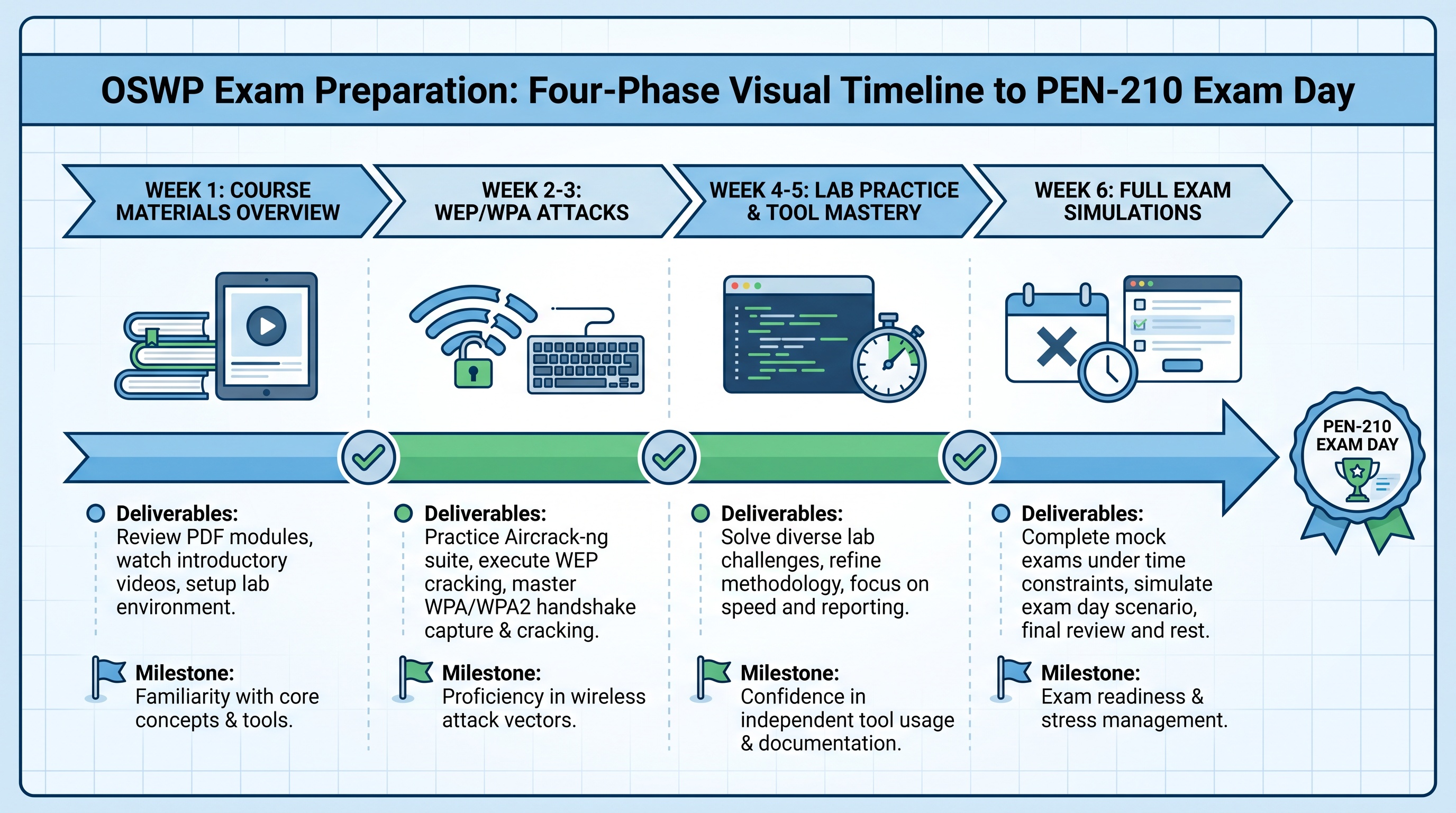
A focused four-to-six week timeline is realistic for candidates who already meet the prerequisites. The numbered checklist below covers every phase from enrollment to exam day.
- Week 1 – Course Walkthrough: Read through all PEN-210 PDF and video material without stopping to practice. Build a mental map of all attack paths: WEP attacks, WPA/WPA2 handshake capture, PMKID attacks, and rogue access points.
- Week 2 – Tool Mastery: Work through every aircrack-ng command demonstrated in the course. Practice interface management (managed vs. monitor mode), packet injection tests, and deauthentication frames until each step is muscle memory.
- Week 3 – Lab Practice on Each Attack Type: Reproduce each attack scenario from scratch in your own lab (see lab setup section below). Do not copy-paste commands. Type them manually to reinforce syntax.
- Week 4 – Timed Practice Runs: Set a timer and run through a complete mock exam scenario. The real PEN-210 exam gives you a fixed window. Practicing under time pressure reveals gaps you cannot find in relaxed lab sessions.
- Week 5 (if needed) – Weak Area Remediation: Identify any attack type that took more than 20 minutes in your mock run. Dedicate focused sessions to that technique only until you can execute it cleanly in under 10 minutes.
- Week 6 – Final Review and Exam Scheduling: Review your notes, confirm your hardware works correctly, and schedule your exam. Avoid cramming new material in the 48 hours before the exam.
How to Set Up Your Wireless Lab
A working wireless lab requires two pieces of hardware that most candidates either overlook or underspend on. Getting this right in week one prevents hardware-related failures on exam day.
Required Hardware
- A wireless adapter that supports monitor mode and packet injection: The Alfa AWUS036ACH and AWUS036NH are the most commonly recommended adapters for PEN-210 candidates. Not all adapters support injection, and a standard laptop Wi-Fi card is almost never sufficient.
- A consumer-grade wireless router for your target: Any cheap TP-Link or ASUS home router running WPA2 will work. Configure it with a known passphrase so you can verify successful attacks.
Software Configuration
Run Kali Linux either natively or in a VM. If using a VM, pass the USB wireless adapter through to the virtual machine directly; do not rely on NAT or bridged host adapters. Confirm injection capability with aireplay-ng --test before starting any practice session. One failed injection test at the start of a session saves hours of troubleshooting later.
A cheap, injection-capable USB adapter is the most important purchase a PEN-210 student makes. The rest of the lab costs almost nothing.
OSWP Exam Day: What to Expect
The PEN-210 exam is a three-hour, fully proctored practical assessment. You connect to an OffSec exam environment containing multiple wireless networks, each requiring a different attack technique to compromise.
| Exam Element | Detail |
|---|---|
| Duration | 3 hours (practical) |
| Format | Remote proctored, live targets |
| Passing criteria | Compromise required targets within the time limit |
| Retake policy | Available via OffSec exam retake purchase |
Manage your time deliberately. Start with the attack type you are most confident in to bank early points, then move to more complex scenarios. Do not spend more than 30 minutes on any single target before rotating to the next one and returning later with a fresh perspective.
Candidates who want additional preparation resources, including walkthrough reports and exam dumps, can explore the full range of OffSec certification support services available at Cyber Services. With over 500 clients served worldwide and continuously updated materials, the platform is built for candidates who need reliable, premium-quality preparation support.
Frequently Asked Questions
How long does it take to prepare for the OSWP certification?
Most candidates with basic Linux and networking skills are ready in four to six weeks of focused study. Candidates without prior wireless or Linux experience should allow eight to ten weeks to cover fundamentals before diving into PEN-210 content.
Do I need a special wireless adapter for the PEN-210 exam?
Yes. You must use a wireless adapter that supports monitor mode and packet injection. OffSec provides a virtual exam environment with pre-configured interfaces, so your personal adapter is only needed for lab practice, not the exam itself. However, practicing with a compatible adapter ensures your commands are correct when it matters.
Is the OSWP certification worth it before OSCP?
Yes, for candidates interested in network-layer attacks. OSWP builds tool confidence, practical exam discipline, and a proven credential that strengthens a junior pentester resume. It is not a prerequisite for OSCP, but the hands-on exam experience translates directly to the OSCP mindset.
Where can I find reliable OSWP exam preparation materials?
Cyber Services provides updated OSWP exam dumps and walkthrough reports specifically designed for PEN-210 candidates. The platform has six years of experience supporting wireless and offensive security certification candidates globally, with a best-price guarantee and a privacy-focused approach.
Did you like this article?
Everything you just read is available on our site-tools, resources, and updates are delivered directly to you. Click the “Buy Now” button on the homepage to get full access today.
{“@context”:”https://schema.org”,”@type”:”Article”,”headline”:”OSWP Certification Study Plan: How to Prepare for the PEN-210 Wireless Exam”,”author”:{“@type”:”Organization”,”name”:”Cyber Services”},”publisher”:{“@type”:”Organization”,”name”:”Cyber Services”,”logo”:{“@type”:”ImageObject”,”url”:”https://xhdswqyfzrihqsonlzcp.supabase.co/storage/v1/object/public/logos/17f6a2f4-f796-4940-b1e6-6bfd4e9d1c2a.png?v=1786023724192″}},”image”:[“https://xhdswqyfzrihqsonlzcp.supabase.co/storage/v1/object/public/article-images/17f6a2f4-f796-4940-b1e6-6bfd4e9d1c2a/75a01f60-412d-4c8f-a600-b090f158fddc/039ec314-0cc0-4264-b5d2-cb60c288b0a2.jpg”],”url”:”https://cyberservices.store/oswp-certification/”,”mainEntityOfPage”:{“@type”:”WebPage”,”@id”:”https://cyberservices.store/oswp-certification/”},”datePublished”:”2026-08-08″,”dateModified”:”2026-08-08″}
{“@context”:”https://schema.org”,”@type”:”FAQPage”,”mainEntity”:[{“@type”:”Question”,”name”:”How long does it take to prepare for the OSWP certification?”,”acceptedAnswer”:{“@type”:”Answer”,”text”:”Most candidates with basic Linux and networking skills are ready in four to six weeks of focused study. Candidates without prior wireless or Linux experience should allow eight to ten weeks to cover fundamentals before diving into PEN-210 content.”}},{“@type”:”Question”,”name”:”Do I need a special wireless adapter for the PEN-210 exam?”,”acceptedAnswer”:{“@type”:”Answer”,”text”:”Yes. You must use a wireless adapter that supports monitor mode and packet injection. OffSec provides a virtual exam environment with pre-configured interfaces, so your personal adapter is only needed for lab practice, not the exam itself. However, practicing with a compatible adapter ensures your commands are correct when it matters.”}},{“@type”:”Question”,”name”:”Is the OSWP certification worth it before OSCP?”,”acceptedAnswer”:{“@type”:”Answer”,”text”:”Yes, for candidates interested in network-layer attacks. OSWP builds tool confidence, practical exam discipline, and a proven credential that strengthens a junior pentester resume. It is not a prerequisite for OSCP, but the hands-on exam experience translates directly to the OSCP mindset.”}},{“@type”:”Question”,”name”:”Where can I find reliable OSWP exam preparation materials?”,”acceptedAnswer”:{“@type”:”Answer”,”text”:”Cyber Services provides updated OSWP exam dumps and walkthrough reports specifically designed for PEN-210 candidates. The platform has six years of experience supporting wireless and offensive security certification candidates globally, with a best-price guarantee and a privacy-focused approach.”}}]}